WAN 2.2 FLF With SVI For Perfecter Infinite Loopage

Details
Download Files (1)
About this version
Model description
See about for v1.2 loader fixes.-->
My output quality is suffering because I haven't switched to prores or png intermediary files yet. That's were the red shift is coming from, repeated h264 compression, a lot of processes are still separate because I'm still figuring out memory management with these gigantic SVI runs. RAM becomes a bottleneck now, even 128GB fills up fast, so still no upscale/interpolate on the end. It's fine if it's just the transition but if you're merging it with the source as the last step, no. Still working on the end of the loop, beginning is perfect I think. I thought about encoding backwards with an overlap, but I think maybe just going forward over the source start frames as if extending, but really locking in the motion might work. If I can match it perfectly then a fade into that would probably work. That's what I'm trying at the moment. Getting there. Come on, you have to admit that anything's better than a jarring jump cut every three seconds. No matter how pretty the picture is.
I continue my quest to make infinite loops truly seamless. Progress is slow at times, backwards at times. SVI is a wonderful nudge in the right direction. The incoming motion is, for all intents and purposes, solved. The other end still needs work, but there is huge improvement here in both motion and color.
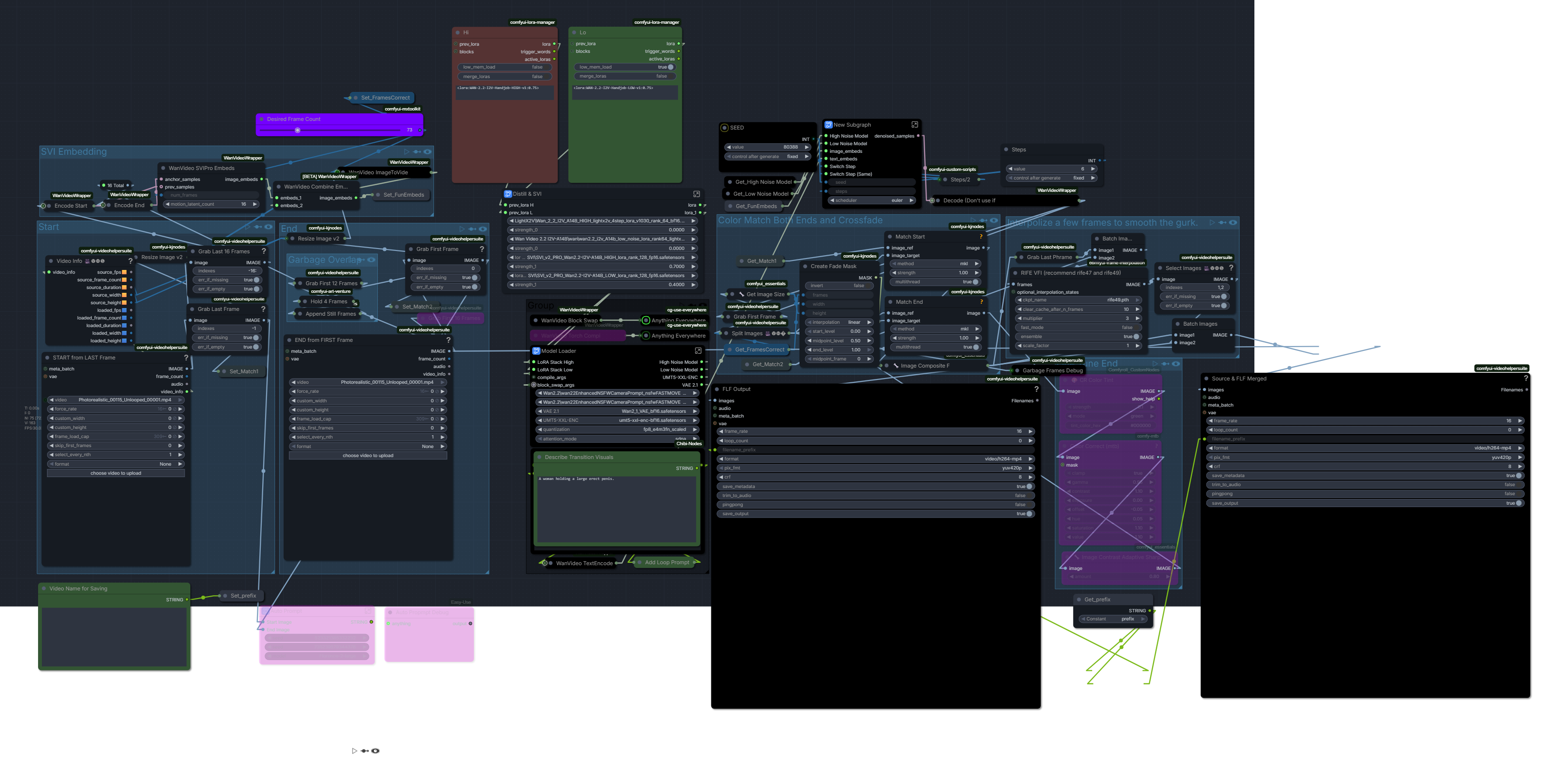
OK so here’s how this works. SVI needs latent frames to do its thing and preserve incoming motion. So we encode the last 16 frames of the end of the source video and use them for our prev_samples. We use one frame of the start of the source as our anchor. The embeds we get from the SVI node are then combined with the embeds from a WAN encoder that also takes a look at our source, but just one frame of each end. Thus armed with a start frame, an end frame and some special magic embeds, we infer. Now, the results aren’t exactly what I was hoping for straight out of the decode, but it’s close. The main issue is that we always get a few frames of garbage at the end. With the native node, this happens when you’re naughty and don’t follow the frame rules, ie 49, 73, etc. (multiple of 4, +1). Now, it turns out that SVI actually messes with the frame count, so if you tell it you want 73 frames, you actually end up with 77. Which is a naughty number. Alas, when we try to be clever by asking for 69 frames, although we’ve successfully fooled it into making 73 frames, we still get garbage at the end. So let’s get cleverer. Is what I said to myself. Since we can’t avoid the garbage, let’s make it predictable. Ergo the duplicator that’s in the setup. We tack a 4-frame hold onto our source, essentially telling it to slow down the motion early. And since in this case we can correlate latent frames with non-magical regular ones, we simply chop four frames off of our eventual output, where we know the garbage is to be found. That make sense? I know what you’re thinking, the extra frames are on the wrong end. Right, wrong. Which turns out right, don’t ask me why, alright?
So, having sorted out motion, for the most part, we turn our attention to color. As I should know, the color of magic is octarine, which of course is unavailable in any node of which I am aware. So we use mkl color matching. But there’s a catch. We have to match not just the beginning, but also the end of the video. Because as we know, it likes to drift. Even moreso now that, with SVI, a base generation is somewhere around 300 frames. Enter the fade mask. We match our video twice, once to the beginning and once to the end. The mask gives us a nice crossfade from our video matched to the end and the video matched to the beginning. Of course sometimes one widget is not enough. Hence the grading group. I have found that I generally only need it at the end, so there is only one group, bypassed by default. You’ll have to work out your own adjustment based upon the light your balls receive. Which can be deceptive, but that’s the way it goes. Estimating corrections is difficult with eyeballs. *For the non-lazy, who are willing to venture outside of comfy to achieve an effect, tricky wicked pickles are greatly aided by a histogram and a vectorscope. Look at the luma histogram in comparison view or superimposed and try to squash or stretch your luma using an equivalent to the available widgets, eg. contrast, value, offset, etc. Same with color, using color vectors. Of course if you’re pulling your outputs into an editor you may just want to color correct there. But it is helpful to make a few presets based on the corrections in your editor, translated to comfy nodes. For steering it in the right direction.*
I’ve been doing my testing with https://civitai.com/models/2053259?modelVersionId=2477539. It’s been the most obedient. There are distillation LoRAs in the loader, not to be used with pre-distilled models, of course. SVI Pro settings are those I found to work best.
On the combine end, you’ve got a choice of saving just the bridge or saving the whole shebang merged. Or both. I’m leaving the interpolation and upscale stages out for the moment. Memory management is becoming very sticky now that we have feature-length generation, and upscaling and interpolizing the 300 or so frames plus the new FLF bridge is not fun for the average thing, that thing inside the box that glows and blows hot air. The microchip ram thing.
I started out with the goal of tacking my existing FLF onto the end of the multi-stage SVI wf, but this gave me major headaches, probably because I was trying to port it to wrapper nodes at the same time. So I decided to first get the port done and adapt it to use SVI by itself before adding to the main build. If it doesn’t integrate that well, I’ll post the SVI workflow by itself. I’ve made enough modifications to justify it I think, mostly automated switching for selecting prompt sets with an index. Helpful when you’ve got four stages of prompting to do and they need to go well with each other. Also consolidated model/sampler settings widgets- with so many stages it's a nightmare to keep jumping into subgraphs to change stuff. But ultimately it’s a generic staged setup, with four stages, puts out around 300 frames.
There are two versions in the .zip. One of them uses my custom node that allows you to extract a path and a filename from a drag and drop video loader, it attaches to the widget on a path loader. I made it because S&R isn’t working for me at the moment, don’t know why. And you really need to be able to connect your incoming filename for this process if you don’t want to get lost, or bored typing it in every time. If node referencing is working for you, you don’t need it, obviously. If you want to use the nodes, just drop the folder into your custom nodes folder and restart comfy. No dependencies needed, it’s just a few lines of python.
Only have one example at the moment...should have made more. Well, I've got tons, but I'm not one of those peoples who feels the need to upload every piece of garbage they make. I select my garbage. There has to be something in it that required more than a click. And it has to have sound. Nothing more useless that a video without sound. Maybe sound without video. That would probably suck too. Point is, I'm way more interested in the technique, making these tools what I want them to do, than I am in making something dazzling. The more invisible, the better. Which is why SVI is so great. Almost there. So close to seamless. I can taste it.