Qwen-Edit-2511_LightingRemap_Alpha0.2

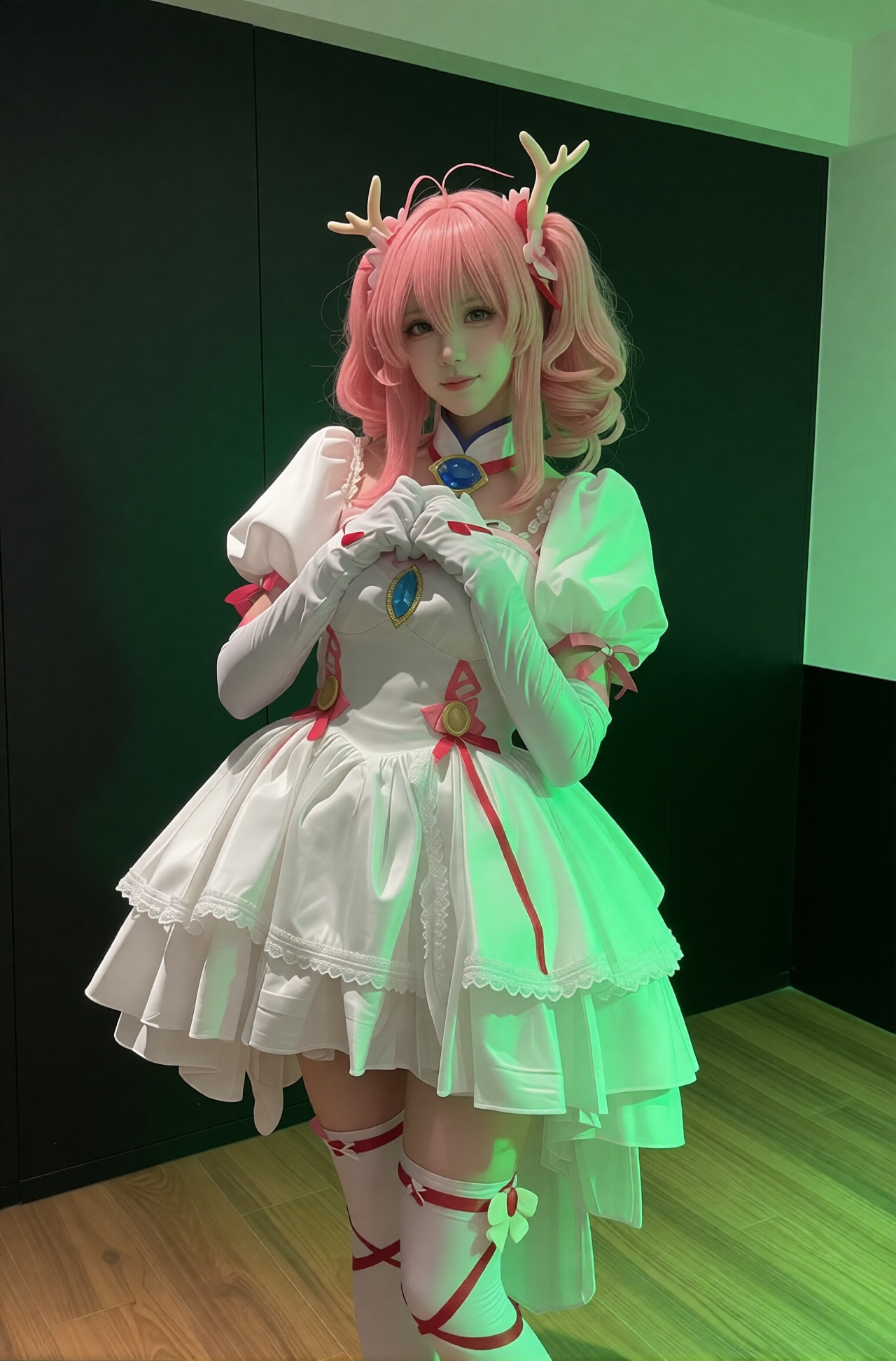


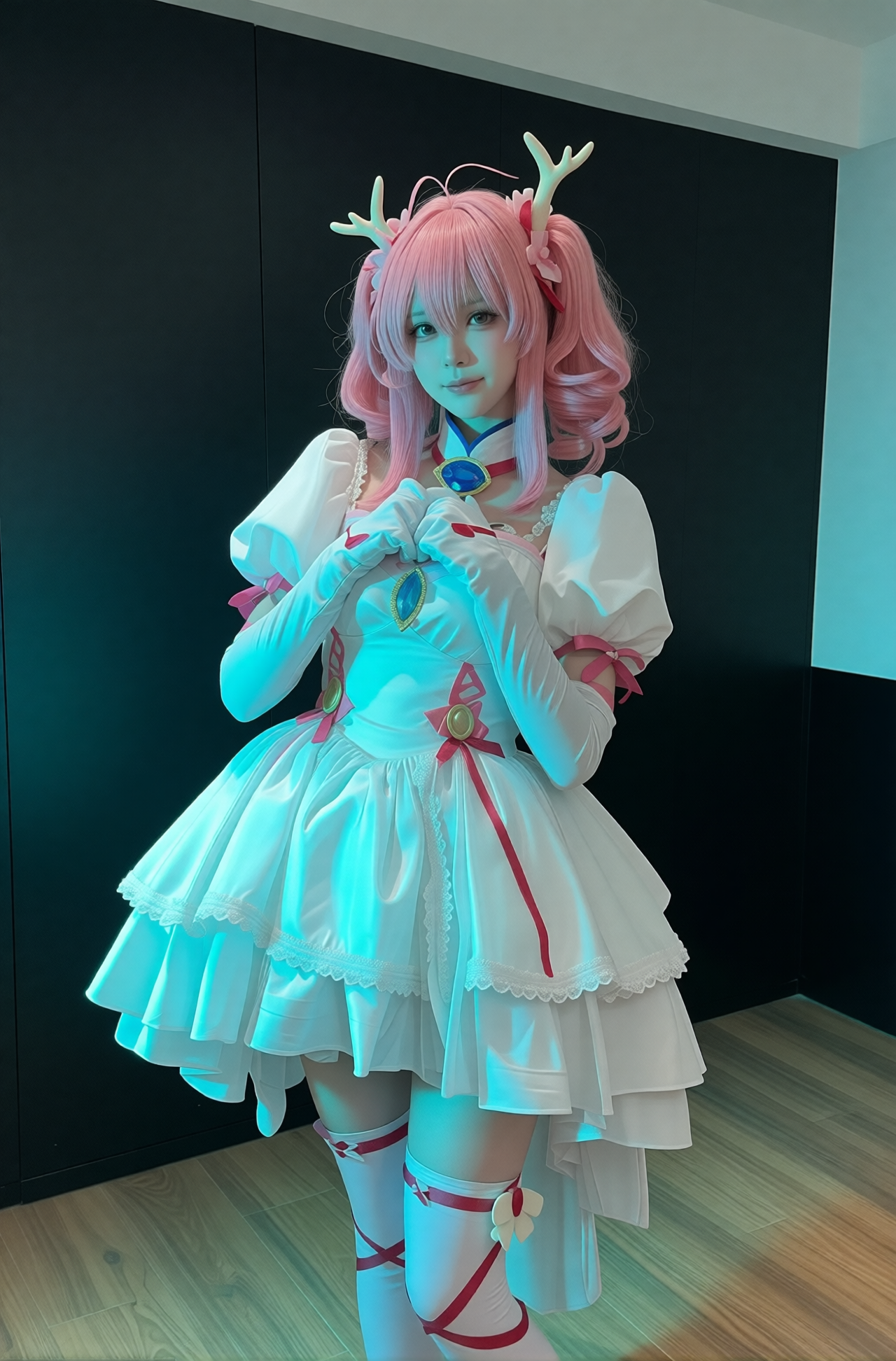


詳細
ファイルをダウンロード
モデル説明
Qwen-Edit-2511_LightningRemap_Alpha
紹介 / Introduction:
これは、Qwen-Edit-2511 モデルに基づいてトレーニングされた Alpha バージョンの LORA で、「色塊による画像の再照明」を実現するために設計されています。この LORA は、入力画像内の特定の色の色塊の位置と色調をもとに、人物やシーンの照明を智能的に再構築し、雰囲気を演出すると同時に、色塊自体を自動的に除去し、自然で高品質な照明効果を生成します。
This is an Alpha-version LORA trained on the Qwen-Edit-2511 model, specifically designed for "color-block-guided relighting." The LORA intelligently reconstructs lighting and renders atmosphere on subjects or scenes based on the position and hue of color blocks in the input image, while automatically removing the blocks themselves to produce natural, high-fidelity illumination.
🌟 核心機能の特徴 / Key Features:
✅ 色塊 = 光源 / Color Block = Light Source: 画像に単色の色塊(例:緑、青、赤、黄、オレンジ)を配置することで、「仮想光源」として機能し、対応する方向性の照明と色調を発生させます。
✅ 色塊の自動除去 / Automatic Block Removal: 出力結果には色塊の痕跡は一切残らず、その色塊が生み出した照明効果のみが表示されます。
✅ 複数の照明スタイル対応 / Multi-Lighting Styles: 冷たい緑、凍えるような青、温かい赤、柔らかい黄、夕焼けオレンジなど、さまざまな照明ムードをサポートします。
✅ 高忠実度のディテール保持 / High-Fidelity Detail Preservation: 素材の質感(布地、髪の毛、顔の特徴など)はそのままに、照明のロジックのみを変更します。
✅ 優れた互換性 / Strong Compatibility: マスク→色塊ノードとシームレスに連携し、精密な制御が可能です。
推奨設定(Alpha バージョン) / Recommended Settings (Alpha):
パラメータ / Parameter 推奨値 / Recommended Value
ベースモデル / Base Model qwen-edit-2511(BF16)
LORA 加速 / LORA Acceleration lightning 加速モードを有効化 / Enable lightning acceleration
ステップ数(Steps) / Sampling Steps 10
LORA 強度 / LORA Weight 1.0
サンプラー / Sampler DPM++ 2M Karras または Euler a
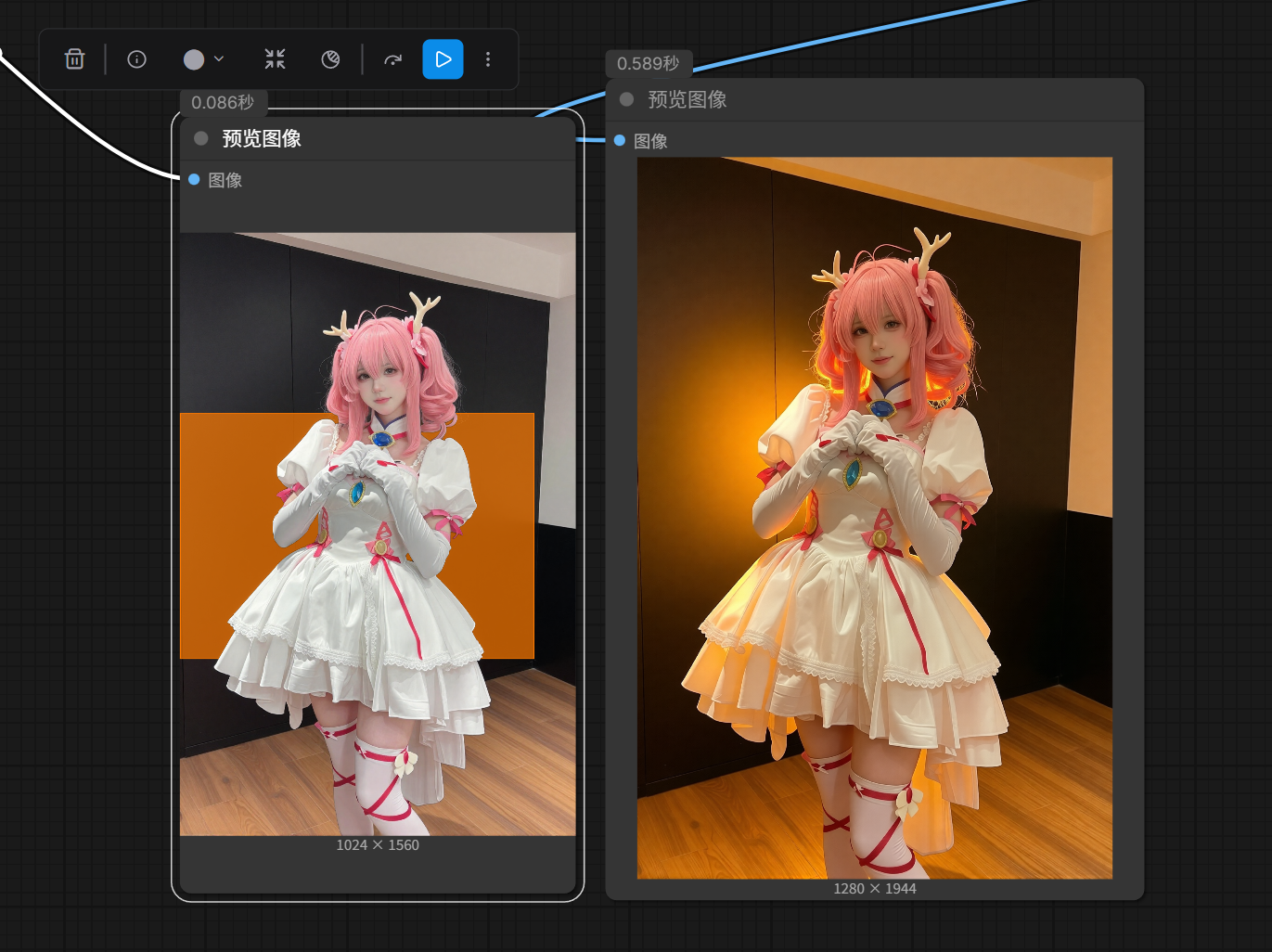
解像度 / Resolution 推奨:1024×1560 → 1280×1944(アスペクト比を維持 / maintain aspect ratio)
使用方法 / Usage Guide:
画像の準備 / Prepare Your Image:
マスク→色塊ノードを使用して、照明を加えたい領域を単色の四角形(例:緑、青、赤、黄、オレンジ)に変換します。
Use the Mask-to-ColorBlock node to convert desired lighting areas into solid-color blocks (e.g., green, blue, red, yellow, orange).
色塊は被写体を覆わないよう、画像の端や角に配置してください。
Place blocks near edges or corners to avoid occluding the main subject.
Qwen-Edit-2511 モデルへの入力 / Input into Qwen-Edit-2511:
色塊を含む画像をモデルに投入し、この LORA を読み込みます。
Feed the image with color blocks into the model and load this LORA.
プロンプトの推奨 / Suggested Prompt:
"re-lighting based on color block, remove the color block, natural lighting, cinematic atmosphere, soft shadows, high detail"出力結果 / Output:
色塊の色と位置に応じて照明効果が生成され(例:緑色塊→クールトーン、赤色塊→ウォームトーン)、色塊は完全に除去されます。
The output will render lighting effects matching the block’s color and position (e.g., green → cool tone, red → warm tone), with the block fully removed.
例示効果 / Example Effects:
緑色塊 / Green Block → 冷たい蛍光効果、SF や不思議な雰囲気に最適 / Cool fluorescent look, ideal for sci-fi or mysterious moods
青色塊 / Blue Block → 清涼感のある冷光、爽やかさを強調 / Crisp cool light, emphasizing freshness
赤色塊 / Red Block → 温かいドラマチックな照明、感情の張りを高める / Warm dramatic lighting, heightening emotional intensity
黄色塊 / Yellow Block → 柔らかな日差し、午後の光を再現 / Soft sunlight, mimicking afternoon glow
オレンジ色塊 / Orange Block → 夕焼けの余韻、温かくロマンチックな雰囲気 / Sunset hues, warm and romantic
注意事項(Alpha バージョン) / Notes (Alpha Version):
⚠️ このバージョンは Alpha テスト版であり、以下の問題が発生する可能性があります:
⚠️ This is an Alpha test version; the following issues may occur:
極めて稀に色塊が完全に除去されない場合がある / Color blocks may rarely persist in output
複雑な背景では照明のトランジションがわずかに歪む可能性がある / Lighting transitions may slightly distort on complex backgrounds
商用最終出力には推奨されず、プレビューおよびクリエイティブ実験に適しています / Not recommended for commercial final output; best for previews and creative experimentation
今後の更新計画 / Roadmap:
複数色塊の組み合わせ(二色照明)のサポート / Support multi-block combinations (e.g., dual-color lighting)
影の強度調整機能の追加 / Add shadow intensity control
エッジのハロー処理の最適化 / Improve halo handling at edges
照明角度のより精密な制御の提供 / Enable finer directional lighting control
まとめ / Closing Note:
Qwen-Edit-2511_LightningRemap_Alpha は「AI 照明制御」への大胆な一歩です。複雑な後処理を必要とせず、単一の色塊だけで「平照明」から「シネマティックな照明」への飛躍を実現します。
🔧 ZoeyTool のマスク→色塊ノードと組み合わせれば、これまでにない非破壊的な照明編集が可能になります!
Qwen-Edit-2511_LightningRemap_Alpha represents a bold step toward AI-powered lighting control. With just a single color block—no complex post-production—you can transform flat lighting into cinematic-grade illumination.
🔧 Paired with ZoeyTool’s Mask-to-ColorBlock node, you gain unprecedented non-destructive lighting editing power!
📥 ダウンロード先(後日公開) / Download (Coming Soon): GitHub Releases
🔗 ノードツール / Node Tool: comfyui-ZoeyTool
💬 ご意見やテスト結果がございましたら、GitHub Issues にてお寄せください!
Let us know your feedback or test results via GitHub Issues!
AI の照明の世界を、共に照らしましょう ✨
Let’s illuminate the world of AI together ✨
Trigger words
You should use 根据图中是色块方向和颜色打光,并移除色块。 to trigger the image generation.
Download model
Download them in the Files & versions tab.