LORA Dataset Tool v2 by Sarcastic TOFU ( Supports MacOS, Linux & Windows.. including offline run)



Details
Download Files (1)
Model description
I developed this LORA DATASET TOOL as a simple, all-in-one stand alone application designed to prepare high-quality images and captions Datasets for training custom LORA models (For SDXL 1.0, Flux, Z-Image, Chroma & QWEN Image) on base level Apple Silicon Mac or on a Linux computer (works on both Nvidia and AMD GPUs/eGPUs.. even on 8GB VRAM). It uses the Florence-2 AI model for automated captioning and provides a gallery view for review and editing. The Florence-2 model is very compact and works well on low end GPUs as compared to regular beefy JoyCaption model. I don't use any Windows computer so I didn't initially build any setup script for Windows but as the LORA DATASET TOOL is written in Python it can also be run easily on Windows if you know how to setup and run Python virtual environment on Windows. But with the newer version 2 I did provide a sample windows batch script (I have not tested it yet) that may work for you with little tweak, also although I did not initially made this tool to run on CPU only mode, folks who tweaked and used it on CPU only mode said this works if you have a good enough CPU & RAM combo even without a dedicated GPU. In this newer version of the toolset I have included all the tweaks ( multires support, single image analyzer etc.) done by jazara930 ( https://civitai.com/user/jazara930 ) and also finetuned them and added some extra improvements ( proper cut, copy, paste popup menu, drag folder to get path on path input fields, Bulk Image processing and some others). The LORA DATASET TOOL v2 has a very easy to follow user interface with four sections (🛠️ LORA DATASET BUILDER, 🔍 LORA DATASET AUDITOR, 🖼️ SINGLE IMAGE ANALYZER & ⚙️ BULK IMAGE TRANSFORMER) each section has it's own dedicated tab. I significantly improved this new version's UI by switching to PyQT6 GUI libraries from old Python TK, so it will look much better and consistent across Linux, Mac & Windows. The new version also improves performance of Caption generation and dataset auditing. By default it uses Flux / Z-Image / Chroma / QWEN Image style natural language captions but with a quick selection you can use SD / SDXL style tag generation features.
------------------------------------------------------------
1. KEY FEATURES & CAPABILITIES
------------------------------------------------------------
* AI-Powered Captioning:
Uses Florence-2-base-PromptGen-v1.5 for ultra-accurate descriptions.
* Hardware Agnostic:
Optimized for Apple Silicon (MPS), Nvidia (CUDA), and AMD (ROCm). Will even run on systems without dedicated GPUs.
* Noob Friendly: No coding required—just drag, drop, and click.
* Full Workflow: From bulk resizing to manual caption auditing, all in one window.
------------------------------------------------------------
2. EXPLORING THE TABS
------------------------------------------------------------
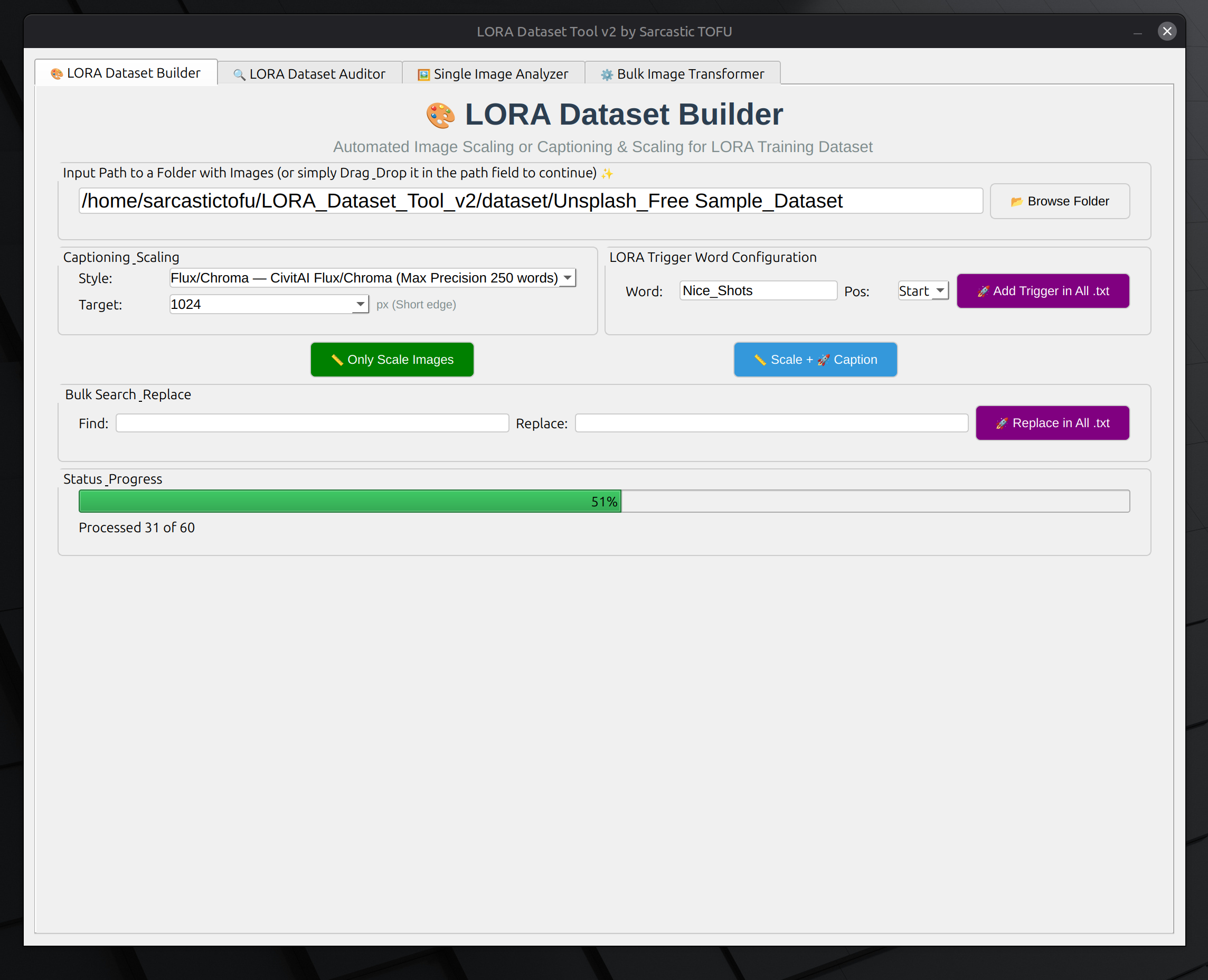
🛠️ LORA DATASET BUILDER (Tab 1)
This is your main workstation.
- Auto-Captioning: Point to a folder with images and let the AI write your .txt file captions matching images.
- Resolution Control: Choose between 512, 768, or 1024px output.
- Custom Tags: Add a "Trigger Word" or "Prefix" (like "in the style of [name]") to every file automatically.
- Drag & Drop: Simply drag a folder into the path field to get started.
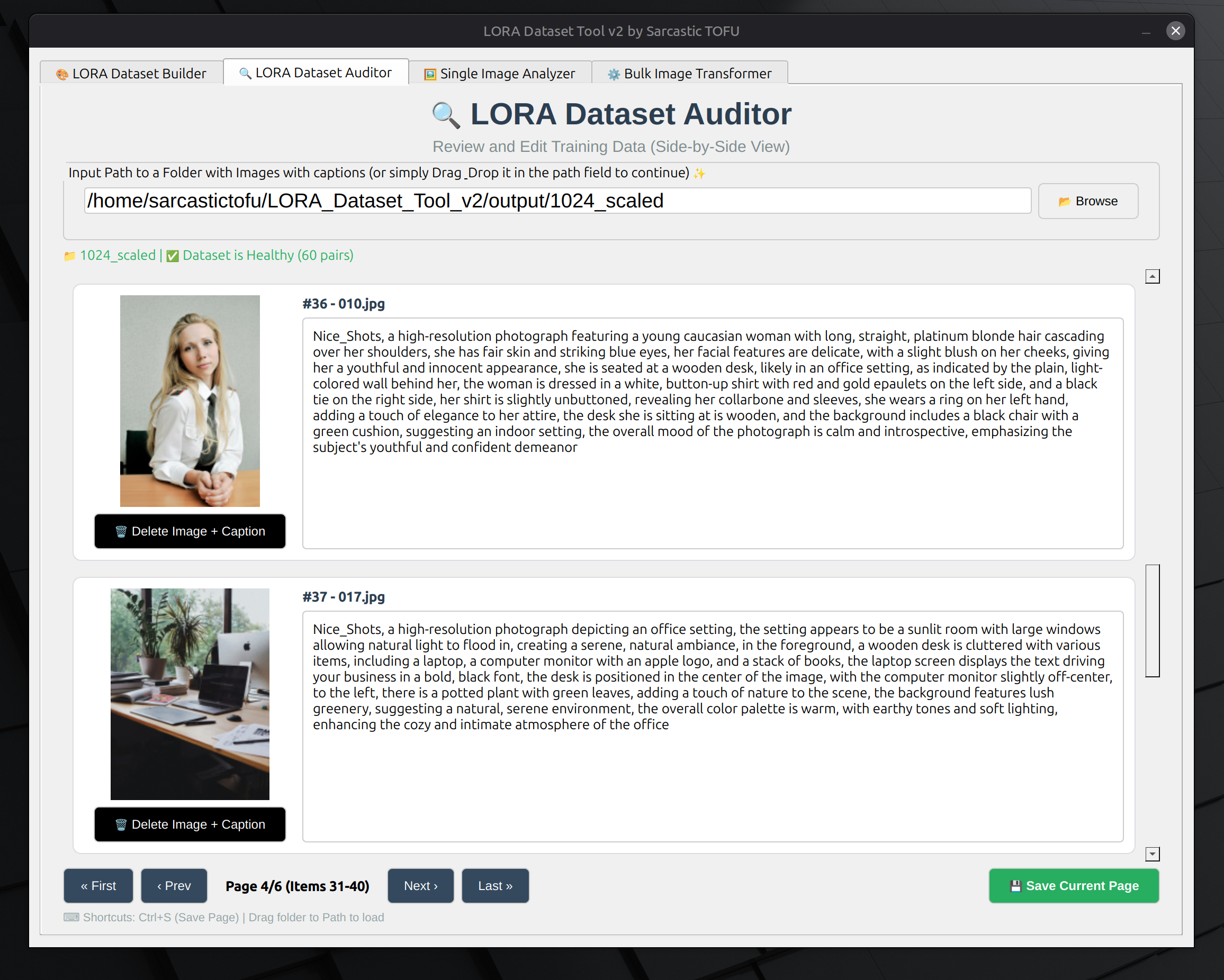
🔍 LORA DATASET AUDITOR (Tab 2)
Precision control for perfectionists.
- Visual Gallery: See your images and captions side-by-side.
- Live Editing: Click any caption to edit it on the fly.
- Dataset Validation: The tool checks for "orphan" files (images without text or text without images) and identifies corrupt files to ensure your trainer doesn't crash.
- Search & Replace: Quickly fix recurring typos across your entire dataset.
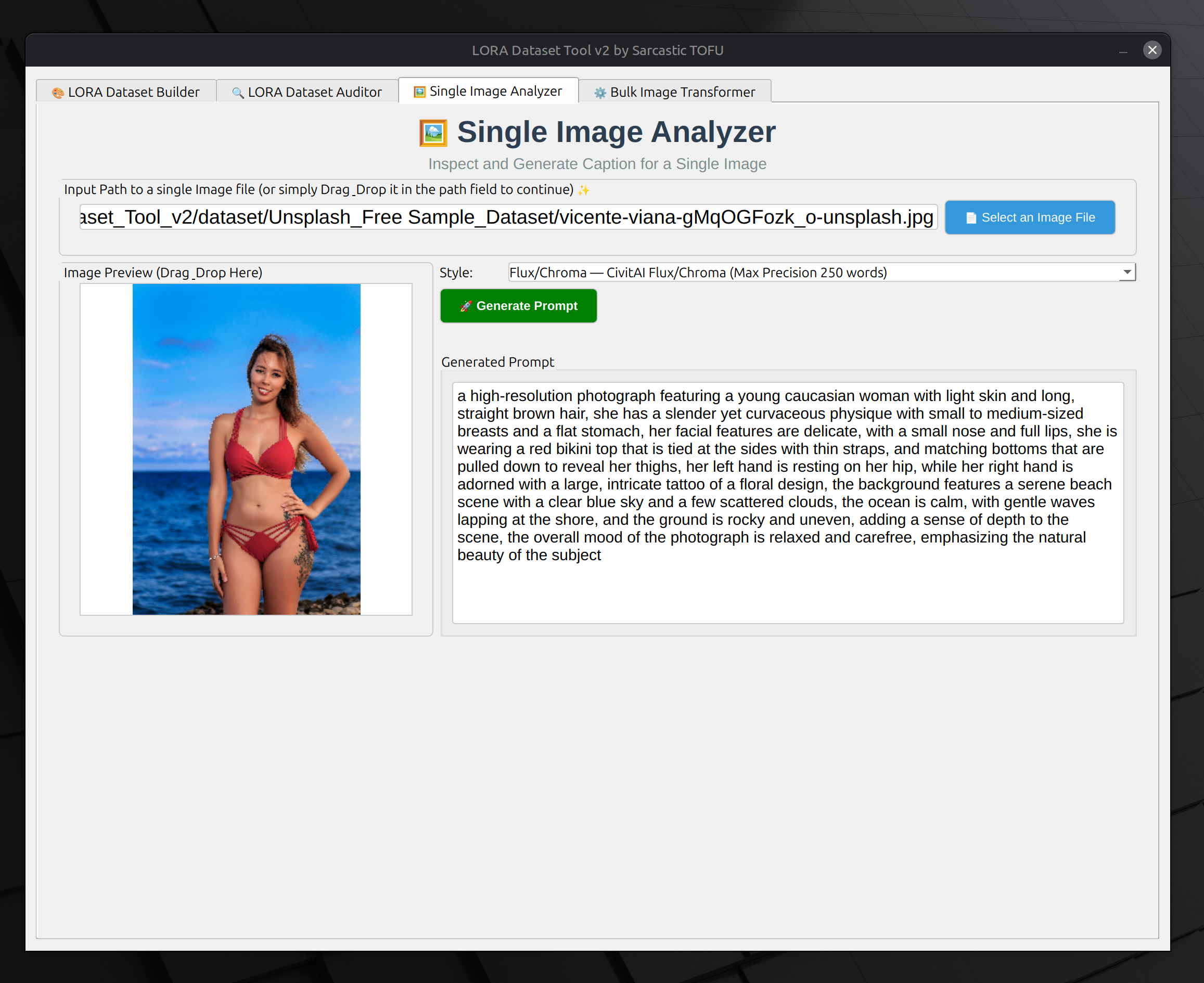
🖼️ SINGLE IMAGE ANALYZER (Tab 3)
The "Quick Look" tool for prompt engineering.
- Instant Feedback: Drag a single image in to see how the AI describes it.
- Copy/Paste Ready: Perfect for testing what keywords the AI uses before you commit to a 1,000-image bulk run.
⚙️ BULK IMAGE TRANSFORMER (Tab 4)
The heavy lifter for prepping raw files.
- Format Conversion: Convert messy PNGs, WebPs, and JPEGs into clean, training-ready files.
- Smart Resizing: Bulk resize your entire collection to a uniform resolution in seconds.
- Easy Transformations: Rotating images, converting color images to black & white for those Noir style LORA training
- Multi-Threaded: Uses your full CPU power to process images in parallel.
------------------------------------------------------------
3. PROJECT FOLDER STRUCTURE
------------------------------------------------------------
Your project folder is organized like this:
LORA_Dataset_Tool_v2/
├── run_linux.sh # The launcher for Linux (CPU or AMD)
├── run_mac.sh # The launcher for macOS (M2/M3)
├── run_windows.bat # The launcher for Windows
├── lora_dataset_tool.py # Main Python script
│
├── venv/ ## Created automatically by run scripts (isolated Python Run Environment)
│
├── models/ # Main storage for local model files
│ ├── florence/ # Florence-2 Model files
│ │ ├── config.json
│ │ ├── model.safetensors
│ │ └── ... (other florence files)
│ │
│ └── joycaption/ # JoyCaption Model files ( I have not implemented this yet )
│ ├── config.json
│ ├── model.safetensors
│ └── ... (other joycaption files)
│
├── dataset/ # Place the images to process
└── output/ # Where scaled images with or without captions are saved
├── 1024_scaled/
├── 768_scaled/
├── 512_scaled/
└── transformed/ # Where Bulk transformed images are saved
------------------------------------------------------------
4. HOW TO USE
------------------------------------------------------------
1. Launch the tool using the script for your OS (run_mac.sh, run_linux.sh, or run_windows.bat).
2. Start with the "Transformer" tab if your images are all different sizes.
3. Use the "Dataset Builder" to generate your AI captions.
4. Open the "Auditor" tab to look through the results and manually fix any captions you don't like.
5. After this, use High-quality datasets made with this data to make high-quality LORAs and Enjoy!
------------------------------------------------------------
5. TROUBLESHOOTING
------------------------------------------------------------
* First Run: You need an internet connection to download the ~1.3 GB Florence-2 model. It sets up an isolated environment so it won't mess with your other Python projects.
* Offline Mode: After the first run, you can use the tool completely offline.
* NVIDIA Power: If you have an NVIDIA GPU, ensure you edit the 'run_linux.sh' (Step 3) to use the "--index-url https://download.pytorch.org/whl/cu121" link for lightning speed.
* Clean Start: If something breaks during installation, run the launcher with the "--clean" argument to reset the environment.
------------------------------------------------------------
Credits: Built with ❤️ for the AI Art community. Includes refinements and features (multi-res, analyzer) by jazara930.
============================================================