zyd232's Workflow for Z-Image - Including SAM2 & SAM3 Inpainting Fix



Details
Download Files (1)
About this version
Model description
Tired of multiple LoRAs interfering with each other and altering the character's appearance?
This workflow uses SAM and LanPaint to fully or semi-automatically inpaint faces or any other specified obejects.
Designed with a modular structure, you can duplicate and connect existing SAM groups to achieve more steps and flexible modifications.
Required Models
Path: .\ComfyUI\models\diffusion_models
Path: .\ComfyUI\models\text_encoders
Path: .\ComfyUI\models\text_encoders
Path: .\ComfyUI\models\yolo
sam2_hiera_base_plus.safetensors
Path: .\ComfyUI\models\sam2
(You need to log in to Hugging Face and fill out a form to gain download access to this model; of course, you may also search for other download sources on your own.)
Path: .\ComfyUI\models\sam3
Required Nodes
After loading the workflow for the first time, please use the "Install Missing Custom Nodes" button in the ComfyUI Manager menu to obtain all the required nodes.
Applying Different LoRAs to Different Steps
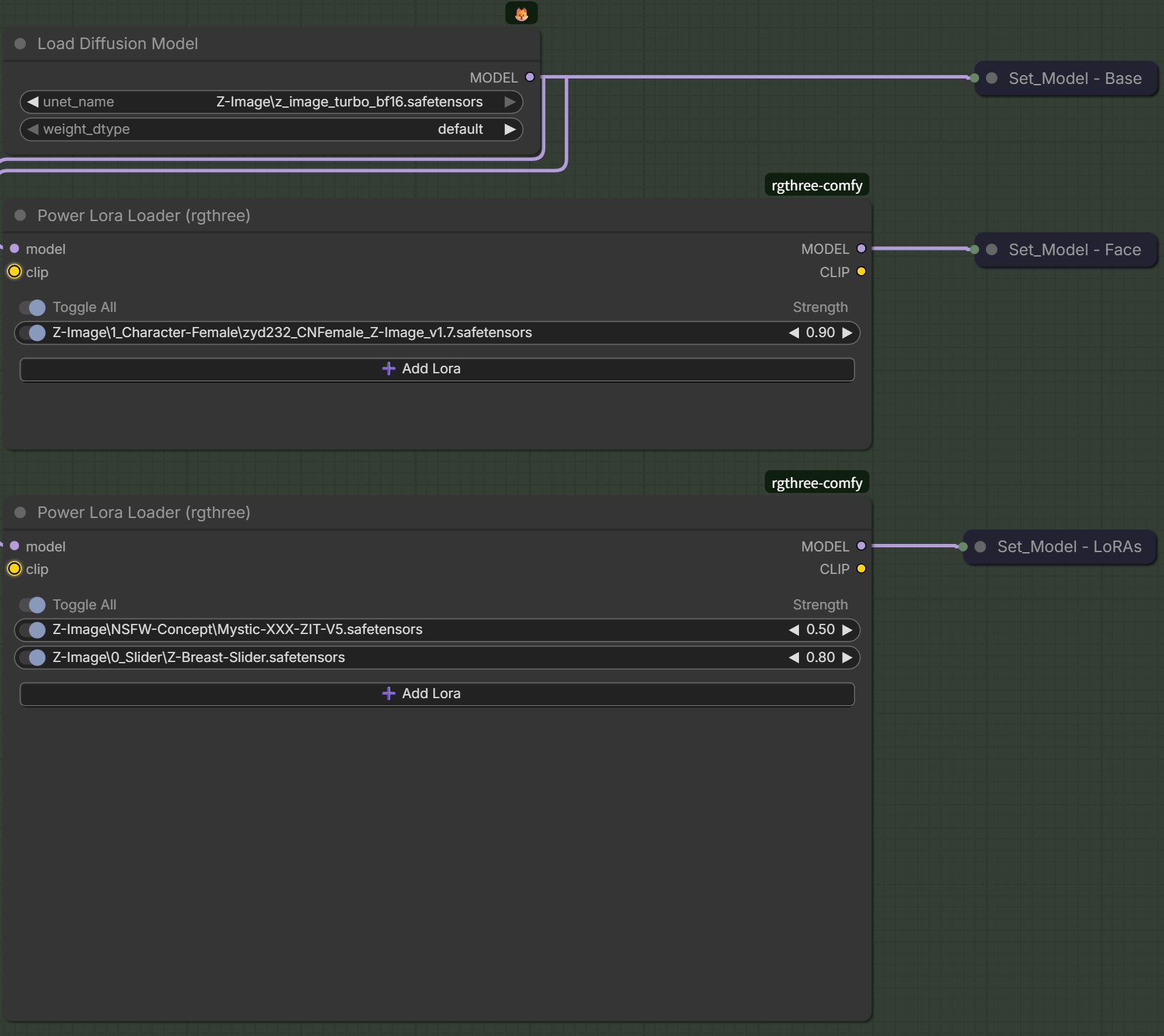
In the "Load Models" group, you will find SetNode nodes such as "Set_Model - Face" and "Set_Model - LoRAs"; in other groups, you will encounter corresponding GetNode nodes like "Get_Model - Face" and "Get_Model - LoRAs". SetNode nodes and GetNode nodes are paired with each other.
You only need to add different LoRAs to the "Power Lora Loader” nodes connected to the SetNode nodes, you can use different LoRA combinations in different steps.
Usage of SAM3 Nodes
Generally, you can bypass the "SAM3 BBox Collector" node and directly use the "text_prompt" parameter in the "SAM3 Text Segmentation" node to automatically segment the parts you need. However, when you want to perform segmentation manually, you can use the "SAM3 BBox Collector" node to freely select objects. For specific usage instructions of SAM3 nodes, refer to: PozzettiAndrea/ComfyUI-SAM3: ComfyUI wrapper for segment anything 3
__________________________________________________________________
厌倦了一堆 LoRAs 相互干扰、导致人物相貌被其他 LoRA 改变?
这个工作流利用 SAM 与 LanPaint,可全自动或半自动地重绘人物脸部、或是其他任何指定的局部。
工作流采用模块化设计,你可以复制、串联已有的SAM组,实现更多步骤的自由修改。
需要的模型
路径: .\ComfyUI\models\diffusion_models
路径: .\ComfyUI\models\text_encoders
路径: .\ComfyUI\models\text_encoders
路径: .\ComfyUI\models\yolo
sam2_hiera_base_plus.safetensors
路径: .\ComfyUI\models\sam2
(你需要登录huggingface并填写表单才能获得该模型的下载资格;当然,你也可以自行搜索其他下载源)
路径: .\ComfyUI\models\sam3
需要的节点
首次导入工作流程后,请使用 ComfyUI Manager 菜单中的 “Install Missing Custom Nodes” 按钮获取所需的所有节点。
针对不同步骤使用不同的LoRA
在 "Load Models" 组中,你可以看到 “Set_Model - Face”、“Set_Model - LoRAs” 这样的 SetNode 节点;在其他组中,你可以看到对应的 “Get_Model - Face”、“Get_Model - LoRAs” 这样的 GetNode 节点。 SetNode 节点和 GetNode 节点互相配对。
你只需要在 SetNode 节点所连接的 “Power Lora Loader” 节点中添加不同的 LoRAs,就可以在不同的步骤中使用不同的 LoRA 组合。
SAM3相关节点的使用方法
通常来说,你可以跳过 "SAM3 BBox Collector" 节点,直接使用 "SAM3 Text Segmentation" 节点中的 “text_prompt” 参数来自动分割你所需要的部分。不过当你想要手动进行分割时,你就可以用 "SAM3 BBox Collector" 节点来自由框选对象了。SAM3相关节点的具体使用方法可以参考:PozzettiAndrea/ComfyUI-SAM3: ComfyUI wrapper for segment anything 3