Flux.2 / Klein Inpaint Segment Ultimate Edit







詳細
ファイルをダウンロード
モデル説明
Segment anything and edit, swap, inpaint on them using Flux.2 Klein (or Dev)!
Crop and stitch makes it so irrelevant parts of the image will not be altered, it will be faster and you can precisely control which edit (or reference image) goes where.

How to use the workflow
IMPORTANT TL;DR first on setting up the most important things.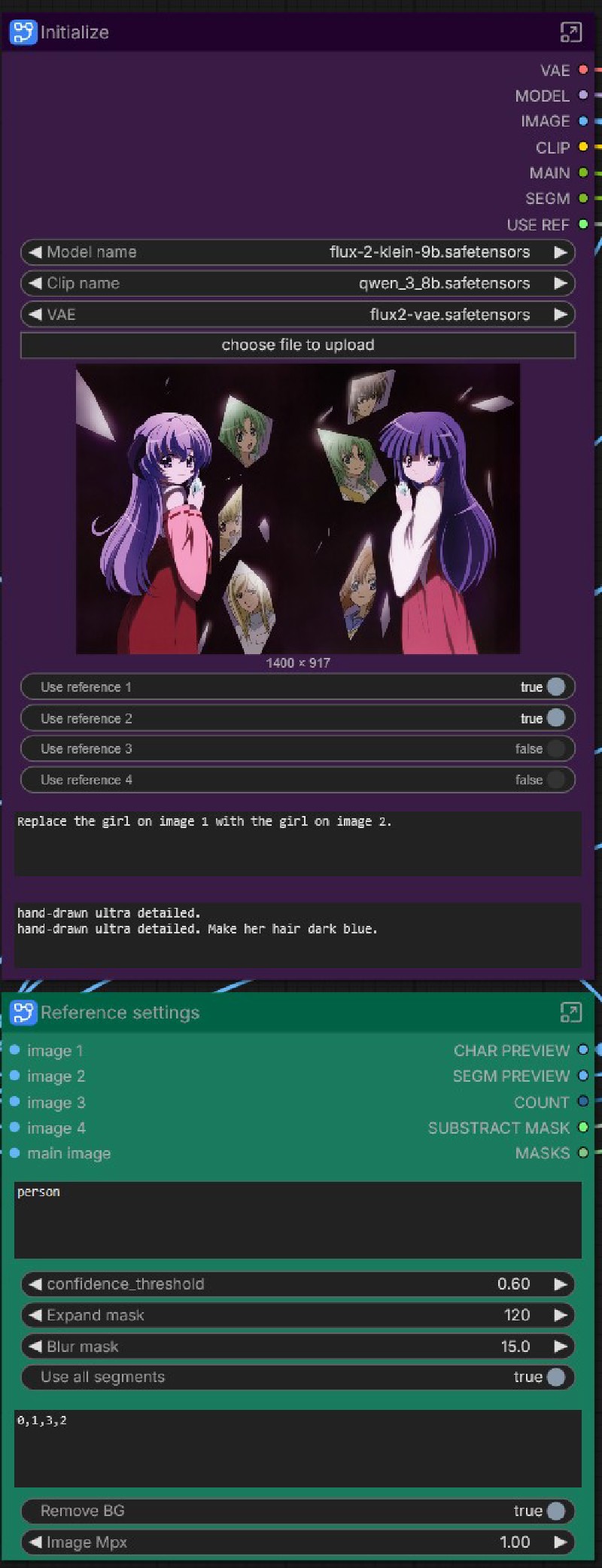 After setting the models, you have to at least prompt on the initialize node (top prompt will be applied to each segment, bottom is per-segment-prompt).
At the Reference settings you have to prompt what to edit.
These are the most important things, the rest you can adjust as you get to know the workflow better.
Initialize
- Select Model, CLIP and VAE.
- Upload image to edit.
- Select if you want to use reference image for each segment.
- Prompt all (will be added first for every segment loop).
- Prompt the segmented area individually (new line / enter between segments).
Reference settings
- Scale reference image size to Megapixels.
- Remove BG: cuts background from the reference image.
- Segment: prompt what you want to edit (character, or in the example vase).
- Confidence: how "strict" the segmentation is; ie. lower gets less likely results, a very high value will only find what you've prompted for if it is extremely likely. Generally 0.3-0.5 works great.
- Expand and blur mask is usually used to give the generation "more space" to move around; unmasked areas will not be touched.
- Substract: useful when you have something within the mask that you absolutely want to keep as is (eg. the eyes of the segmented character, when you only want to edit other parts on her).
- [SAM3/SAM2] model: select your segmentation model.
- Use all segments: true will loop through every resulted segments. If you set it to false, you can select which segments to use. Refer to the Preview Segment node on the left - which is highly recommended to run first to preview the resulting segments before prompting and selecting them!
Load image 1-4
- Load reference images. If you have more segments than reference images, the rest will run only as normal edit (with no reference)! You can add more images if you need - or ask me to make them, if you don't want to engineer inside.
Loop sampler
- Use random seed: workaround to get random seeds within subgraphs. Set it to false for manual seed.
- Seed (when not using random)
- Steps, sampler, guidance (cfg) as normally
- Scheduler: choose between Flux.2, Beta with model or normal schedulers; if set to normal, "scheduler for normal" lets you choose among the "usual" schedulers. My tests told me setting it to Beta is great - but you can always test and see what works best for you.
- Scale: up/down scale segmented area upon crop.
I have included 2 types of workflows, both with SAM2 and SAM3 version:
- A simple edit (with no reference images); the rest of the functionality is the same.
- A reference edit with up to 4 reference images (do ask me if you need more).