Kandinsky 3.1










詳細
ファイルをダウンロード (1)
モデル説明
This is not a stable diffusion model. It requires its own web UI. Read below for more information.
note: I am not the author of the model, the link to the original HF repository is below.
Kandinsky 3.1 is available for use now:
The source code for the model, released under the Apache 2.0 license, can be found on GitHub: https://github.com/ai-forever/Kandinsky-3
The model is available for download and use on Hugging Face: https://huggingface.co/ai-forever/Kandinsky3.1
The model has its own "AUTOMATIC1111": Kubin, for local use: https://github.com/seruva19/kubin
You can test Kandinsky's capabilities on the FusionBrain website: https://www.sberbank.com/promo/kandinsky/
The original description of the repository:
license: apache-2.0Kandinsky-3: Text-to-image diffusion model

Kandinsky 3.0 Post | Kandinsky 3.1 Post | Project Page | Generate | Telegram-bot | Technical Report | HuggingFace
Kandinsky 3.1:
Description:
We present Kandinsky 3.1, the follow-up to the Kandinsky 3.0 model, a large-scale text-to-image generation model based on latent diffusion, continuing the series of text-to-image Kandinsky models and reflecting our progress to achieve higher quality and realism of image generation, which we have enhanced and enriched with a variety of useful features and modes to give users more opportunities to fully utilise the power of our new model.
Kandinsky Flash (Kandinsky 3.0 Refiner)

Diffusion models have problems with fast image generation. To address this problem, we trained a Kandinksy Flash model based on the Adversarial Diffusion Distillation approach with some modifications: we trained the model on latents, which reduced the memory overhead and removed distillation loss as it did not affect the training. Also, we applied Kandinsky Flash model to images generated from Kandinsky 3.0 to improve visual quality of generated images.
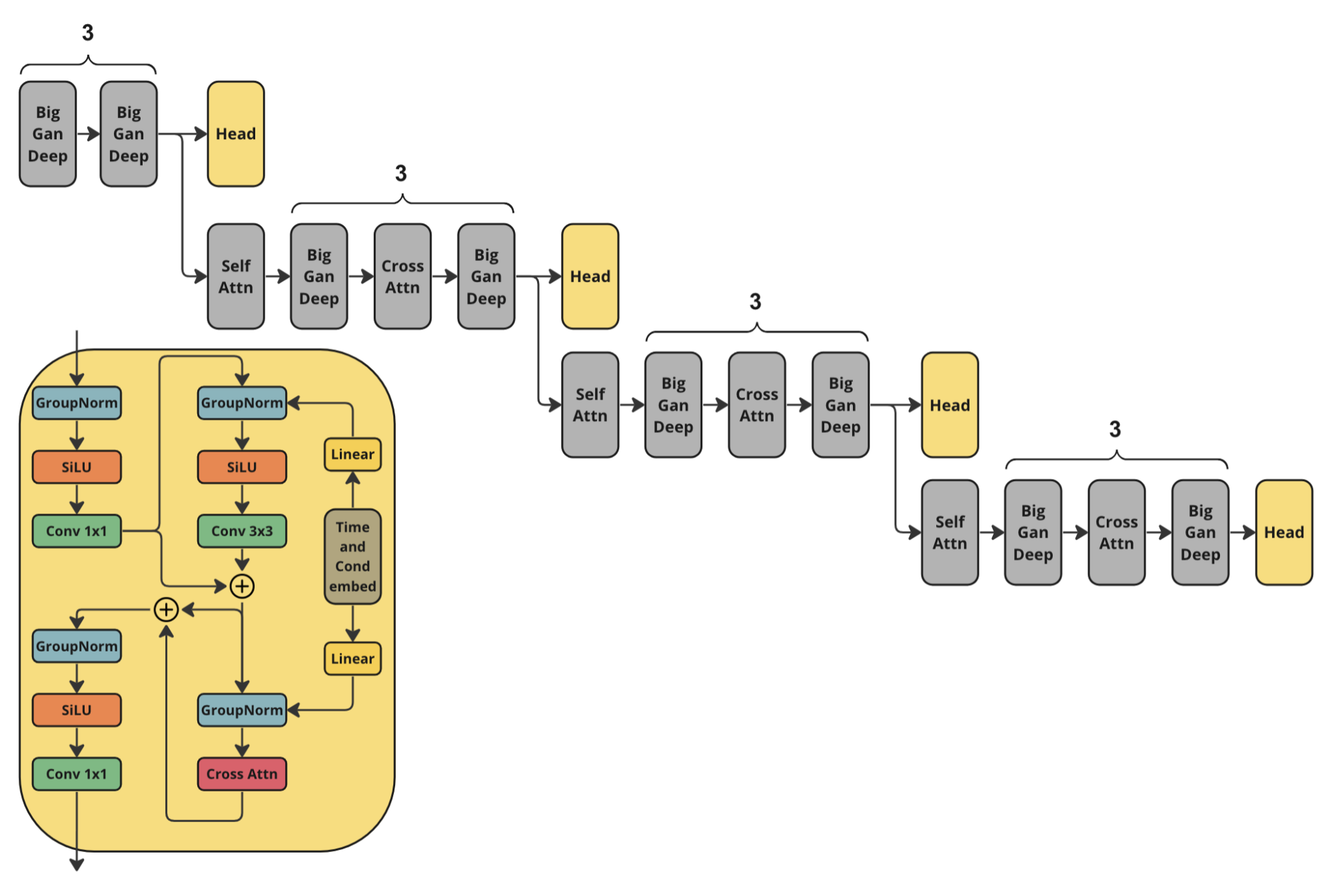
Architecture
For training Kandinsky Flash we used the following architecture of discriminator. It is the half of Kandinsky 3.0 U-Net encoder with additional head predictions.
How to use:
Check our jupyter notebooks with examples in ./examples folder
from kandinsky3 import get_T2I_Flash_pipelinedevice_map = torch.device(‘cuda:0’) dtype_map = { ‘unet’: torch.float32, ‘text_encoder’: torch.float16, ‘movq’: torch.float32, }
t2i_pipe = get_T2I_Flash_pipeline( device_map, dtype_map )
res = t2i_pipe(“A cute corgi lives in a house made out of sushi.”)
Kandinsky Inpainting
Also, we released a newer version of inpainting model, which we additionally trained the model on the object detection dataset. This allowed to get more stable generation of objects. The new weights are available at ai-forever/Kandinsky3.1. Check the usage example.
Prompt beautification

Prompt plays crucial role in text-to-image generation. So, in Kandinsky 3.1 we decided to use language model for making prompt better. We used Intel’s neural-chat-7b-v3-1 with the following system prompt as the LLM:
### System: You are a prompt engineer. Your mission is to expand prompts written by user. You should provide the best prompt for text to image generation in English.User:
{prompt}
Assistant:
{answer of the model}
KandiSuperRes

To learn more about KandiSuperRes, please checkout: https://github.com/ai-forever/KandiSuperRes/
Kandinsky IP-Adapter & Kandinsky ControlNet

To allow using image as condition in Kandinsky model, we trained IP-Adapter and HED-based ControlNet model. For more details please check out: https://github.com/ai-forever/kandinsky3-diffusers
Kandinsky 3.0:
Description:
Kandinsky 3.0 is an open-source text-to-image diffusion model built upon the Kandinsky2-x model family. In comparison to its predecessors, Kandinsky 3.0 incorporates more data and specifically related to Russian culture, which allows to generate pictures related to Russin culture. Furthermore, enhancements have been made to the text understanding and visual quality of the model, achieved by increasing the size of the text encoder and Diffusion U-Net models, respectively.
For more information: details of training, example of generations check out our post. The english version will be released in a couple of days.
Architecture details:

Architecture consists of three parts:
Text encoder Flan-UL2 (encoder part) - 8.6B
Latent Diffusion U-Net - 3B
MoVQ encoder/decoder - 267M
Models
We release our two models:
Base: Base text-to-image diffusion model. This model was trained over 2M steps on 400 A100
Inpainting: Inpainting version of the model. The model was initialized from final checkpoint of base model and trained 250k steps on 300 A100.
Installing
To install repo first one need to create conda environment:
conda create -n kandinsky -y python=3.8;
source activate kandinsky;
pip install torch==1.10.1+cu111 torchvision==0.11.2+cu111 torchaudio==0.10.1 -f https://download.pytorch.org/whl/cu113/torch_stable.html;
pip install -r requirements.txt;
The exact dependencies is got using pip freeze and can be found in exact_requirements.txt
How to use:
Check our jupyter notebooks with examples in ./examples folder
1. text2image
import sys sys.path.append(‘..’)import torch from kandinsky3 import get_T2I_pipeline
device_map = torch.device(‘cuda:0’) dtype_map = { ‘unet’: torch.float32, ‘text_encoder’: torch.float16, ‘movq’: torch.float32, }
t2i_pipe = get_T2I_pipeline( device_map, dtype_map, ) res = t2i_pipe(“A cute corgi lives in a house made out of sushi.”)
res[0]
2. inpainting
from kandinsky3 import get_inpainting_pipelinedevice_map = torch.device(‘cuda:0’) dtype_map = { ‘unet’: torch.float16, ‘text_encoder’: torch.float16, ‘movq’: torch.float32, }
pipe = get_inpainting_pipeline( device_map, dtype_map, )
image = … # PIL Image mask = … # Numpy array (HxW). Set 1 where image should be masked image = inp_pipe( “A cute corgi lives in a house made out of sushi.”, image, mask)
Authors
Vladimir Arkhipkin: Github
Anastasia Maltseva Github
Andrei Filatov Github,
Igor Pavlov: Github
Julia Agafonova
Citation
@misc{arkhipkin2023kandinsky,
title={Kandinsky 3.0 Technical Report},
author={Vladimir Arkhipkin and Andrei Filatov and Viacheslav Vasilev and Anastasia Maltseva and Said Azizov and Igor Pavlov and Julia Agafonova and Andrey Kuznetsov and Denis Dimitrov},
year={2023},
eprint={2312.03511},
archivePrefix={arXiv},
primaryClass={cs.CV}
}