Flux.1 dev seamless outpainting workflow

详情
下载文件 (1)
模型描述
This is a seamless oupainting workflow for the Flux.1 dev model, which requires no prompts. It can seamlessly join image borders without leaving traces and allows for local image expansion, all without the need for any prompt words.
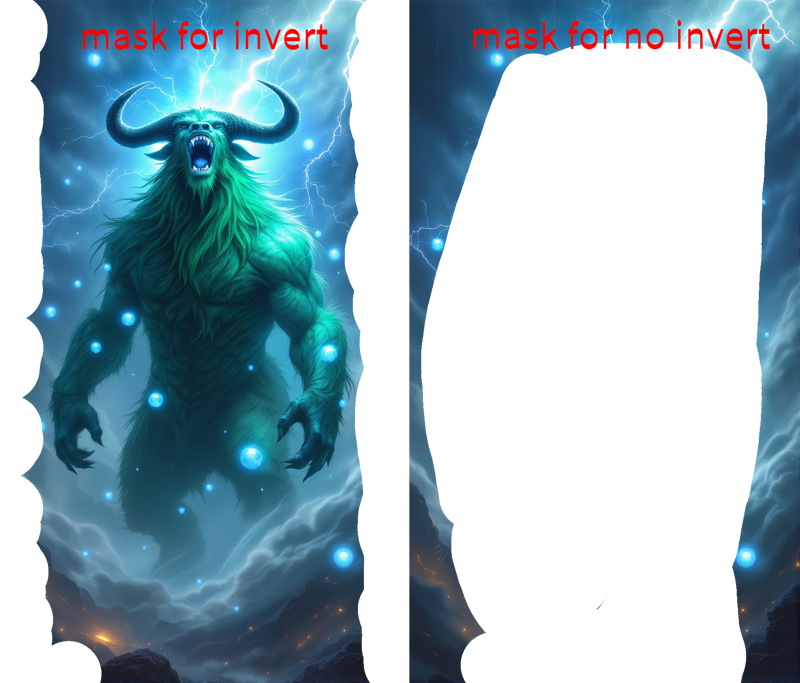
1. 蒙版设置 mask
蒙版的涂抹方式有两种(默认第一种)。
1)在需要扩图的边缘,涂上不规则的蒙版,防止图像衔接处过于明显,此时要在layerunity中开启invert mask(默认已经开启)。
2)对不想改变的主体涂上蒙版,并且用比较不规则的蒙版边缘,此时要在在layerunity中关闭invert mask。
There are two ways to apply the mask (with the first option being the default):
1)Apply an irregular mask to the edges where the image needs to be extended, to prevent the image seams from being too noticeable. In this case, make sure to enable “invert mask” in LayerUnity (this is enabled by default).
2)Apply a mask to the subject you don’t want to change, using a more irregular mask edge. In this case, make sure to disable “invert mask” in LayerUnity.
2.参数 setting
1)x_percent y_percent
x_percent 增大,图像主体右移,反之左移。
y_percent 增大,图像主体上移,反之下移。
When x_percent increases, the main subject of the image shifts to the right, and vice versa to the left.
When y_percent increases, the main subject of the image moves upwards, and vice versa downwards.
2)expand
开启invert 的时候,expand设为-1
关闭invert 的时候,expand设为1
默认开启invert,expand为-1
When “invert” is enabled, set “expand” to -1.
When “invert” is disabled, set “expand” to 1.
By default, “invert” is enabled, and “expand” is set to -1.
3、模型 model
1)llm moel:大语言模型模型组,首次运行会自动下载,若下载失败可以手动下载放到ComfyUI/models/LLM/unsloth--Meta-Llama-3.1-8B-Instruct 文件夹,下载地址:https://huggingface.co/unsloth/Meta-Llama-3.1-8B-Instruct(全部文件)
2)clip vision:https://huggingface.co/google/siglip-so400m-patch14-384/tree/main 下载所有文件并放置在 ComfyUI\models\clip_vision\google--siglip-so400m-patch14-384 文件夾
3)Joy capiton lora:https://huggingface.co/spaces/fancyfeast/joy-caption-alpha-two 下载所有文件并放置在 ComfyUI\models\Joy_caption\cgrkzexw-599808
4)alimama工作室的 flux dev controlnet inpainting beta模型,下载后放入models/controlnet/flux文件夹,下载地址:https://huggingface.co/alimama-creative/FLUX.1-dev-Controlnet-Inpainting-Beta/tree/main
1)LLM Model:
•The large language model group will download automatically during the first run.
•If the download fails, you can manually download the files and place them in the following folder:
ComfyUI/models/LLM/unsloth--Meta-Llama-3.1-8B-Instruct
•Download link: https://huggingface.co/unsloth/Meta-Llama-3.1-8B-Instruct (download all files).
2)Clip Vision:
•Download all files from:
https://huggingface.co/google/siglip-so400m-patch14-384/tree/main.
•Place them in the folder:
ComfyUI/models/clip_vision/google--siglip-so400m-patch14-384.
3)Joy Caption LoRA:
•Download all files from: https://huggingface.co/spaces/fancyfeast/joy-caption-alpha-two.
•Place them in the folder:
ComfyUI/models/Joy_caption/cgrkzexw-599808.
4)Flux Dev ControlNet Inpainting Beta model from Alimama Studio.
•After downloading, place the files in the models/controlnet/flux folder.
•Download link: https://huggingface.co/alimama-creative/FLUX.1-dev-Controlnet-Inpainting-Beta/tree/main.