Probably the simplest Workflow in the world.


詳細
ファイルをダウンロード (1)
このバージョンについて
モデル説明
Introduction:
I'm a simple person, I don't like to spend a lot of time touching too many parameters in things that can be simplified a lot. And because of that way of being, I have created this Workflow, that despite not being the most professional in the world, it is enough to generate images in a few steps to upload them to Civitai (or whatever you want) and keep the metadata. Compatible with Lora and with a (basic, but sufficient) upscaler.
Before installing:
Before using the workflow make sure you update your ComfyUI, because in my other workflows, some people had problems because they didn't have ComfyUI updated to the latest version.
Once the workflow is downloaded, simply drag the .json file to ComfyUI and then select "install missing nodes" in ComfyUI Manager (make sure you have this installed too).
Art in 3 steps (or 2, if you don't want to use Lora):
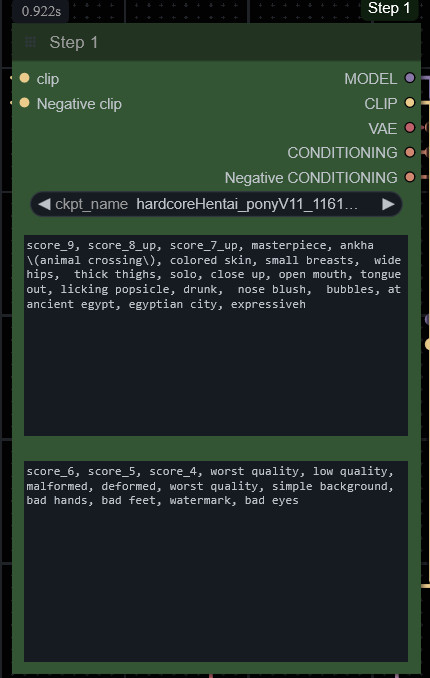
Step 1: Select the checkpoint and enter a prompt.
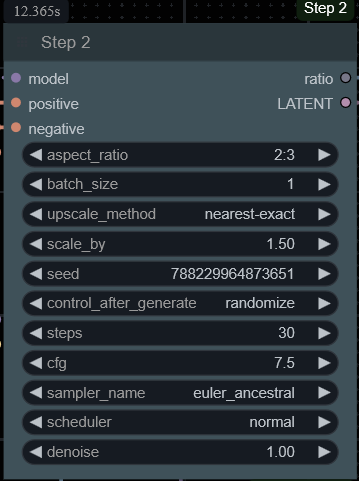
 Step 2: Select the aspect ratio, steps, etc.
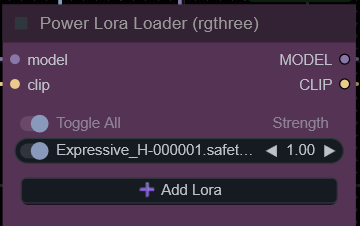
 Step 3 (optional): Select some lora.
 And that's it. There you have your image, simple, fast, and with a lot of potential.
 ->OPTIONAL (but highly recommended)<-
I highly, highly recommend installing this node, from the user KingLord (in case it doesn't load automatically when using the workflow). And download the wildcards from navimixu. (if you select step 1 - text, when you select a wildcard it will be automatically written in the prompt box)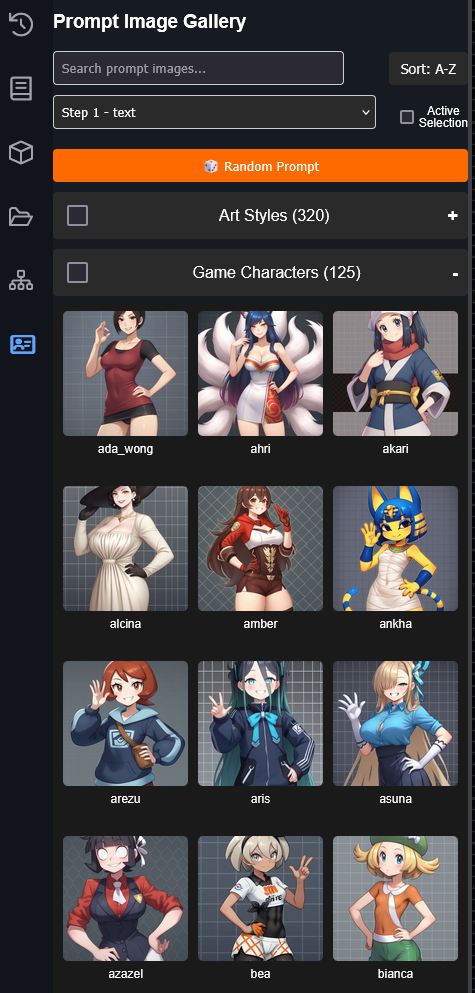
Another quick tip. In the ComfyUI settings, select pysssss and click "manage custom words", then click "load" and then Save. This will make it so that when you start typing a promt it will help you autocomplete the word. For example: if you want to type 1 girl, when you type 1, you will get the autocomplete option (press TAB).