Kiko XY Plot

Details
Download Files (1)
About this version
Model description
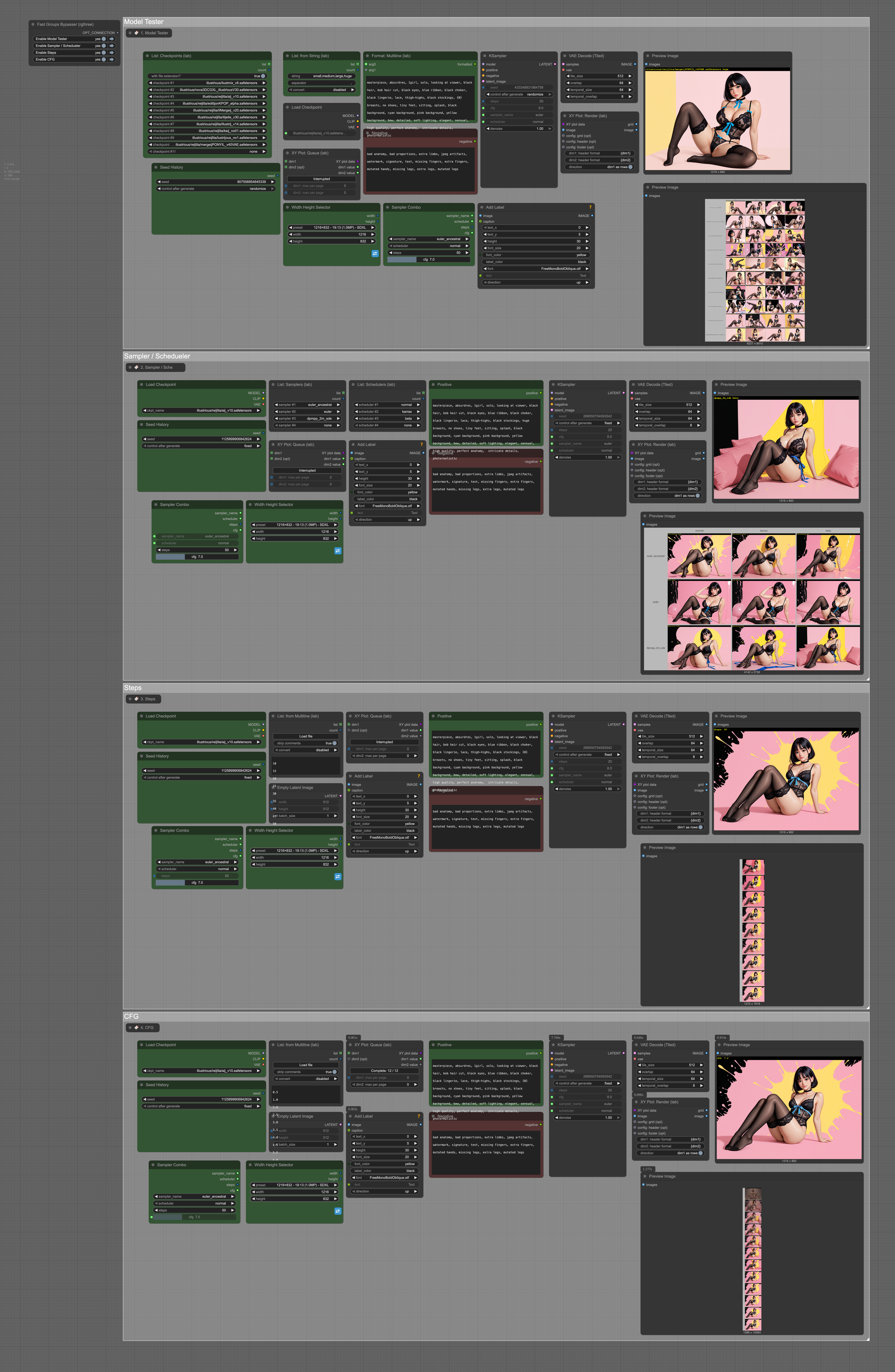
Kiko XY Model Testing Workflow
Overview
This ComfyUI workflow is designed as a comprehensive testing suite to systematically find the optimal generation parameters for any given prompt. The workflow consists of four sequential testing phases, each building upon the results of the previous phase to progressively narrow down the best settings.
Purpose: To determine the optimal combination of model, sampler, scheduler, steps, and CFG values before proceeding to batch generation workflows.
Execution: Must be run sequentially (Parts 1→2→3→4) due to ComfyUI's execution model and parameter dependencies.
Workflow Structure
Part 1: Model Testing
Objective: Identify the best model (checkpoint) for your specific prompt
Tests all your available Illustrious models against your prompt
Generates an XY grid with labels comparing model performance
Provides visual comparison to select the optimal base model
Output: Best performing model identified for subsequent tests
Part 2: Sampler & Scheduler Testing
Objective: Find the optimal sampler and scheduler combination
Uses the best model identified in Part 1
Tests various sampler and scheduler combinations
Generates labeled XY grid for easy comparison
Output: Optimal sampler/scheduler pair for your use case
Part 3: Steps Optimization
Objective: Determine the ideal number of generation steps
Uses the optimal model, sampler, and scheduler from previous parts
Tests different step counts to find the sweet spot between quality and generation time
Generates labeled XY grid showing step count impact
Output: Optimal step count for your specific setup
Part 4: CFG Scale Testing
Objective: Fine-tune CFG (Classifier Free Guidance) values
Uses all previously optimized parameters (model, sampler, scheduler, steps)
Tests various CFG values to find the best prompt adherence vs. creativity balance
Generates final labeled XY grid
Output: Complete optimized parameter set ready for production workflows
Technical Implementation
Sequential Execution Requirements
Due to ComfyUI's execution model, each part must complete before the next begins:
Part 1 must finish to provide the optimal model selection
Part 2 depends on Part 1's model choice to test samplers/schedulers
Part 3 requires both model and sampler/scheduler from previous parts
Part 4 needs all prior optimizations to test CFG effectively
XY Grid Generation
Each testing phase generates labeled comparison grids:
Visual side-by-side comparison of parameter variations
Clear labeling for easy identification of optimal settings
Systematic layout for methodical evaluation
Custom Nodes Dependencies
This workflow requires the following custom nodes:
Core Functionality Nodes
AddLabel - ComfyUI-KJNodes
GetNode - ComfyUI-KJNodes
SetNode - ComfyUI-KJNodes
JoinStrings - ComfyUI-KJNodes
Text Processing
BNK_CLIPTextEncodeSDXLAdvanced - ComfyUI_ADV_CLIP_emb
FormatMultiline - ComfyLab-Pack
ttN text - ComfyUI_tinyterraNodes
List Management
ListCheckpoints - ComfyLab-Pack
ListFromMultiline - ComfyLab-Pack
ListFromString - ComfyLab-Pack
ListSamplers - ComfyLab-Pack
ListSchedulers - ComfyLab-Pack
Interface & Controls
Bookmark (rgthree) - rgthree-comfy
Display Int (rgthree) - rgthree-comfy
Fast Groups Bypasser (rgthree) - rgthree-comfy
Sampling & Generation
SamplerCombo - ComfyUI-KikoTools
WidthHeightSelector - ComfyUI-KikoTools
SeedHistory - ComfyUI-KikoTools
XY Grid Generation
XYPlotQueue - ComfyLab-Pack
XYPlotRender - ComfyLab-Pack
Utilities
String to Float - comfyui_HavocsCall_Custom_Nodes
StringToInt - comfyui-string-converter
PathchSageAttentionKJ - ComfyUI-KJNodes
Prompt Enhancement
easy negative - ComfyUI-Easy-Use
easy positive - ComfyUI-Easy-Use
Installation Requirements
Before using this workflow, ensure all custom nodes are installed:
# Navigate to your ComfyUI custom_nodes directory
cd ComfyUI/custom_nodes/
# Clone required repositories
git clone https://github.com/kijai/ComfyUI-KJNodes
git clone https://github.com/BlenderNeko/ComfyUI_ADV_CLIP_emb
git clone https://github.com/rgthree/rgthree-comfy
git clone https://github.com/bugltd/ComfyLab-Pack
git clone https://github.com/ComfyAssets/ComfyUI-KikoTools
git clone https://github.com/HavocsCall/comfyui_HavocsCall_Custom_Nodes
git clone https://github.com/glowcone/comfyui-string-converter
git clone https://github.com/yolain/ComfyUI-Easy-Use
git clone https://github.com/TinyTerra/ComfyUI_tinyterraNodes
Usage Workflow
Setup: Load the workflow and configure your base prompt
Execute Part 1: Run model testing, review XY grid results
Select Best Model: Choose optimal model from Part 1 results
Execute Part 2: Run sampler/scheduler testing with chosen model
Select Best Combination: Choose optimal sampler/scheduler pair
Execute Part 3: Run step count optimization
Select Optimal Steps: Choose best step count for quality/speed balance
Execute Part 4: Run final CFG testing with all optimized parameters
Record Results: Document the final optimized parameter set
Production: Use optimized settings in batch generation workflows
Benefits
Systematic Optimization: Methodical approach ensures no optimal combinations are missed
Visual Comparison: XY grids make it easy to spot quality differences
Time Efficient: Automated testing saves manual trial-and-error time
Reproducible: Consistent testing methodology across different prompts
Foundation for Production: Optimized parameters provide solid foundation for batch workflows
Notes
This workflow is designed specifically for Illustrious model family testing
Results are prompt-specific and may vary significantly with different prompts
Consider saving parameter sets for different prompt types/styles
The workflow can be modified to test additional parameters as needed