ComfyUI beginner friendly SDXL 1.0 Seamless Fast Inpaint Workflow (With LORAs) by SarcasticTOFU [[Very Fast]]




Details
Download Files (1)
Model description
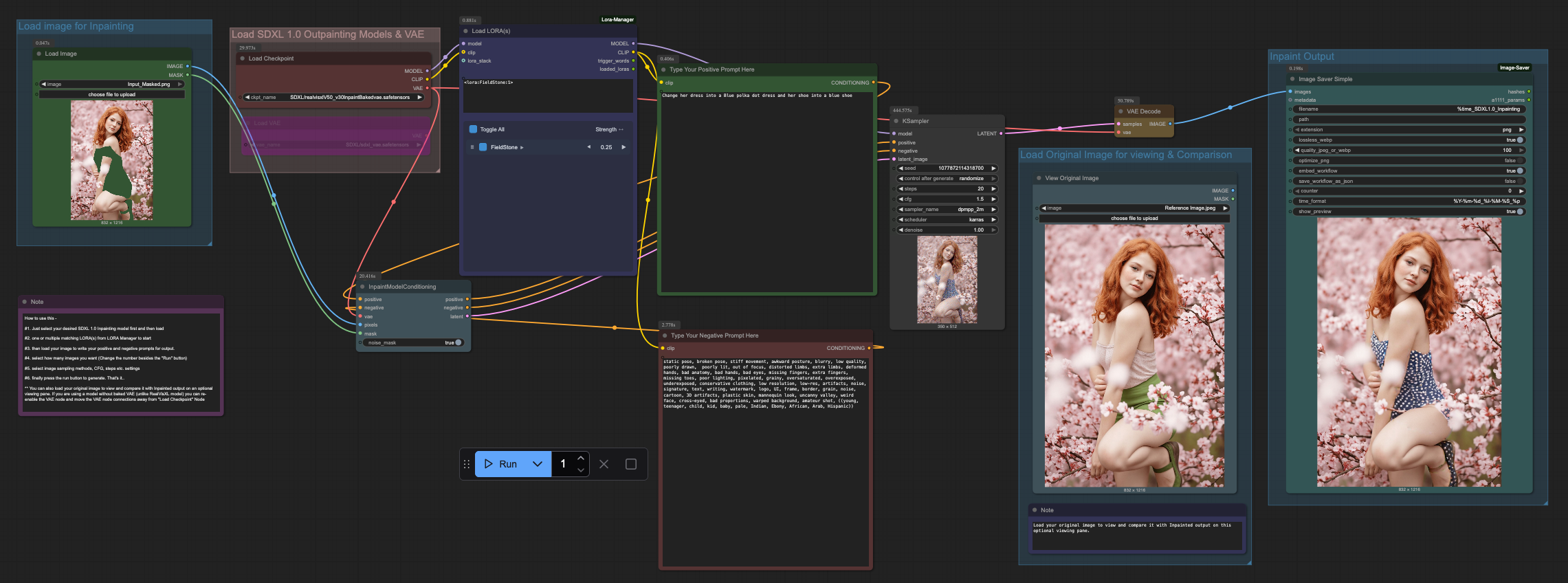
This is a very simple ComfyUI beginner friendly Inpaint workflow that will work with a single SDXL model with multiple LORAs (This workflow does require ComfyUI's LORA Manager plugin to function. It is a good idea to install both ComfyUI manager and LORA Manager plugin to help you easily download and manage Checkpoints, LORAs and other resources. Not only these two are helpful for this workflow but they will help you a lot in any other cases). You need to download your necessary model and LORA from CivitAI (Details are mentioned below). Make sure using ComfyUI manager to download and place the correct files in correct places. Also check out my other workflows for HiDream, WAN, QWEN Image and Flux. (I also included a text file on the archive that has the workflow file, in which you will find even more links for essential downloads for my other workflows by logging into HuggingFace). This is a based on my earlier uploaded Inpaint workflow for WAN 2.1 as I felt SDXL 1.0 has better Seamless and Fast Inpaint capabilities that is very helpful to quickly change some details. If you want to add texts or more details you can use my Inpaint workflow for WAN 2.1 or QWEN Image.
How to use this -
#1. Just select your desired SDXL 1.0 Inpainting model first and then load
#2. one or multiple matching LORA(s) from LORA Manager to start
#3. then load your image to write your positive and negative prompts for output.
#4. select how many images you want (Change the number besides the "Run" button)
#5. select image sampling methods, CFG, steps etc. settings
#6. finally press the run button to generate. That's it..
** You can also load your original image to view and compare it with Inpainted output on an optional viewing pane. If you are using a model without baked VAE (unlike RealVisXL model) you can re-enable the VAE node and move the VAE node connections away from "Load Checkpoint" Node
Model and LORA used -
==================================
Model - RealVisXL v3.0 Inpaint (Baked VAE) - https://civitai.com/models/139562?modelVersionId=297320
LORA - Field Stone - https://civitai.com/models/612539?modelVersionId=684738