Collage [QwenEdit]


세부 정보
파일 다운로드 (1)
이 버전에 대해
모델 설명
PLEASE READ
(Works quite well with res2/bong_tengent 20 steps on QIE, can work on QIE 2509 with 40 steps!)
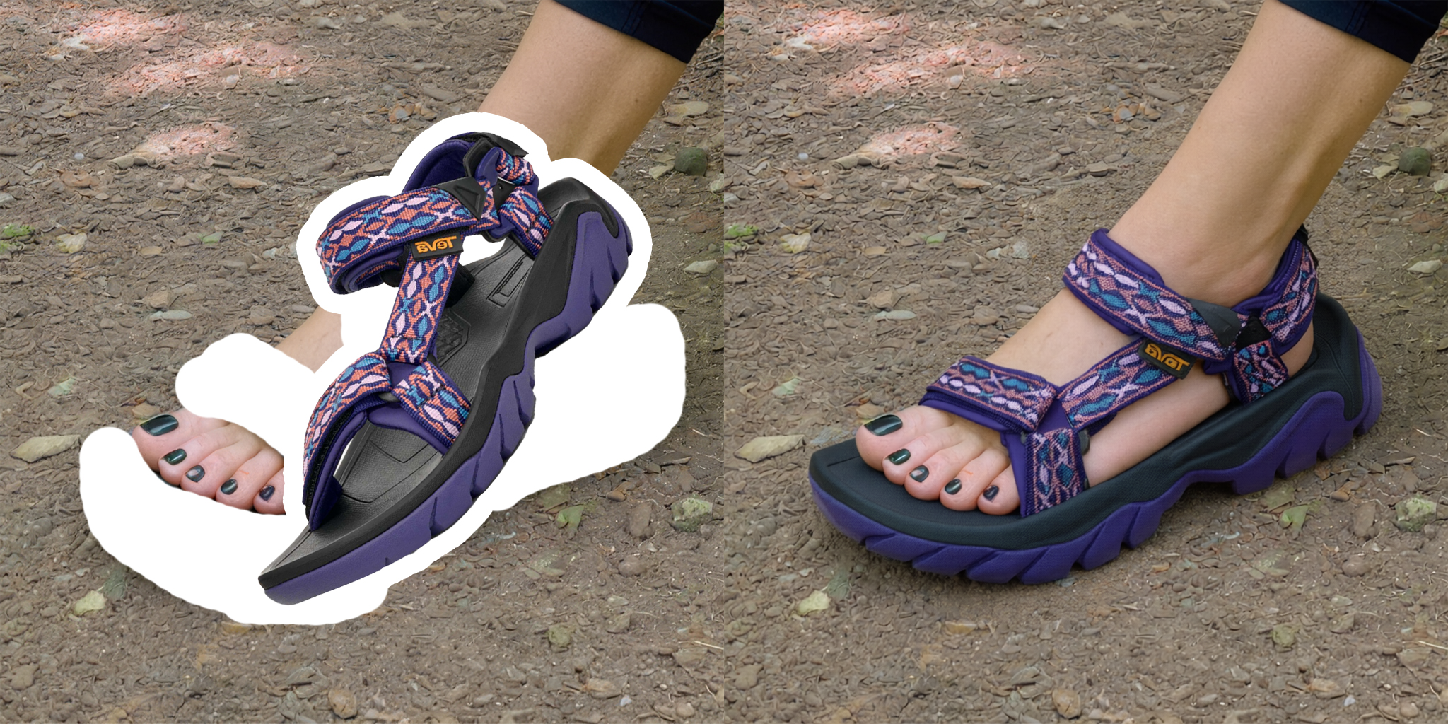
This LoRA, "Collage," is a specialized tool for Qwen-Image-Edit, designed to seamlessly integrate a pasted reference element into a source image. It goes beyond simple pasting by intelligently matching the lighting, orientation, shadows, and respecting occlusions for a photorealistic blend. It was trained on a high-quality, hand-curated dataset of 190 image pairs, where each pair consists of a source image and a target image edited according to a specific instruction. It works, most of the time, when QwenEdit or QwenEdit2509 don't for those specific tasks. It is not perfect and will mostly work only with the concepts it learned (listed below). It can handle most stuffs if you need to replace specific body parts. BTW, It can preserve the shapes of the parts you don't want to change in your image if the white stroke doesn't cover those areas (spaces, body parts, limbs, fingers, toes, etc.).
You will need to paste an element on an existing image using whatever tool you have and add a white stroke around it. Just one image input is needed in your workflow but you'll need to prepare it. The whole dataset and all the examples provided are 1024*1024px images!
LoRA strenght used: 1.0
Use the following prompt and replace what's bold with your elements:
Collage, seamlessly blend the pasted element into the image with the [thing] on [where]. Match lighting, orientation, and shadows. Respect occlusions.
A few examples:
Collage, seamlessly blend the pasted element into the image with the cap on his head. Match lighting, orientation, and shadows. Respect occlusions.
Collage, seamlessly blend the pasted element into the image with the face on her head. Looking down left. Match lighting, orientation, and shadows. Respect occlusions.
Collage, seamlessly blend the pasted element into the image with the sculpture in the environment. Match lighting, orientation, and shadows. Respect occlusions.
Collage, seamlessly blend the pasted element into the image with the object on the desk. Match lighting, orientation, and shadows. Respect occlusions.
Collage, seamlessly blend the pasted element into the image with the hoodie on her body. Match lighting, orientation, and shadows. Respect occlusions.
Collage, seamlessly blend the pasted element into the image with the sandals at her feet. Match lighting, orientation, and shadows. Respect occlusions.
You might need to use more generic vocabulary if the thing you want to change in your image is too specific.
My dataset was split in different categories for this first LoRA, so don't be surprised if it doesn't work on a specific thing it never learned. These were the categories for the V1 with the amount of pairs used in each of them:
faces (54 pairs)
furniture (14 pairs)
garments (17 pairs)
jewelry (14 pairs)
bodies (24 pairs)
limbs (35 pairs)
nails (14)
objects in hand (11)
shoes (24 pairs)
I might release a new version someday with an even bigger dataset. Please give me some category suggestions for the next version.
Thanks!