Next Scene (Qwen Image Edit Lora 2509)

Details
Download Files (1)
About this version
Model description
Use with workflow: https://civitai.com/models/2065461?modelVersionId=2337222
🎉 ✨ UPDATE - Version 2 Now Available! (21 Oct 2025) ✨ 🎉
🚀 New Model: next-scene_lora-v2-3000.safetensors
What's New in V2:
🎯 Trained on higher quality data for significantly improved results
💪 Better command responsiveness - the model follows your prompts more accurately
🖼️ Fixed black bar artifacts - no more unwanted black borders on generated images
⚡ Overall enhanced performance - smoother transitions and better cinematic flow
Recommended: Use V2 for all new projects.
📥 ComfyUI Workflow: https://civitai.com/models/2065461?modelVersionId=2337222
🧠 What This Model Does
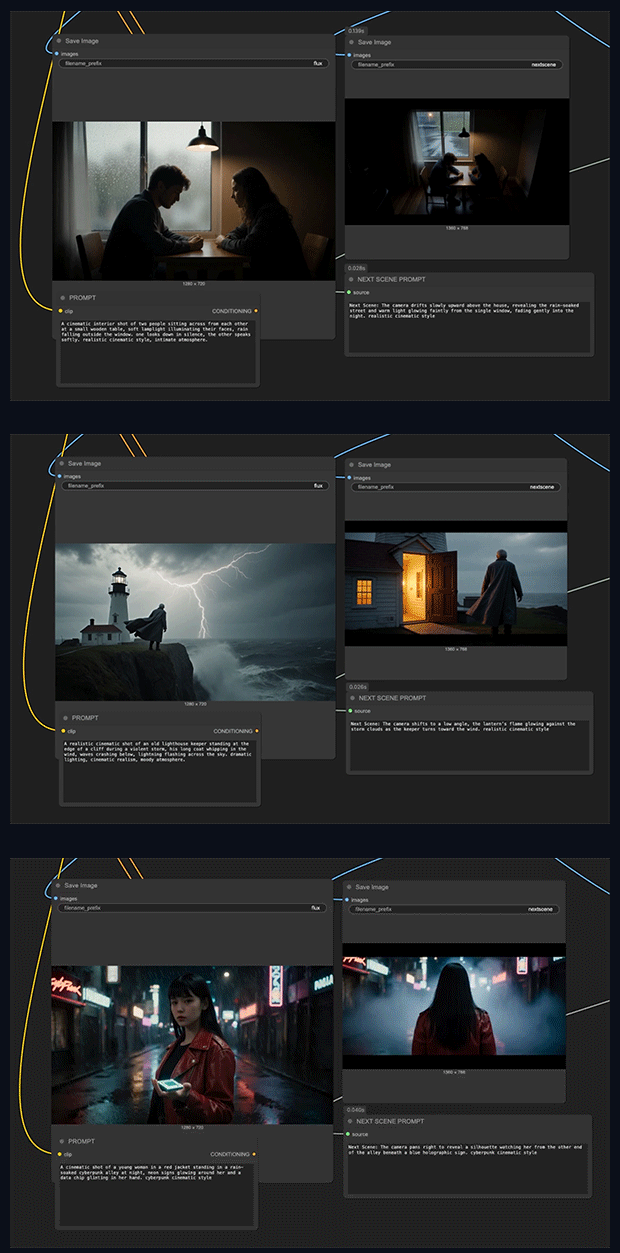
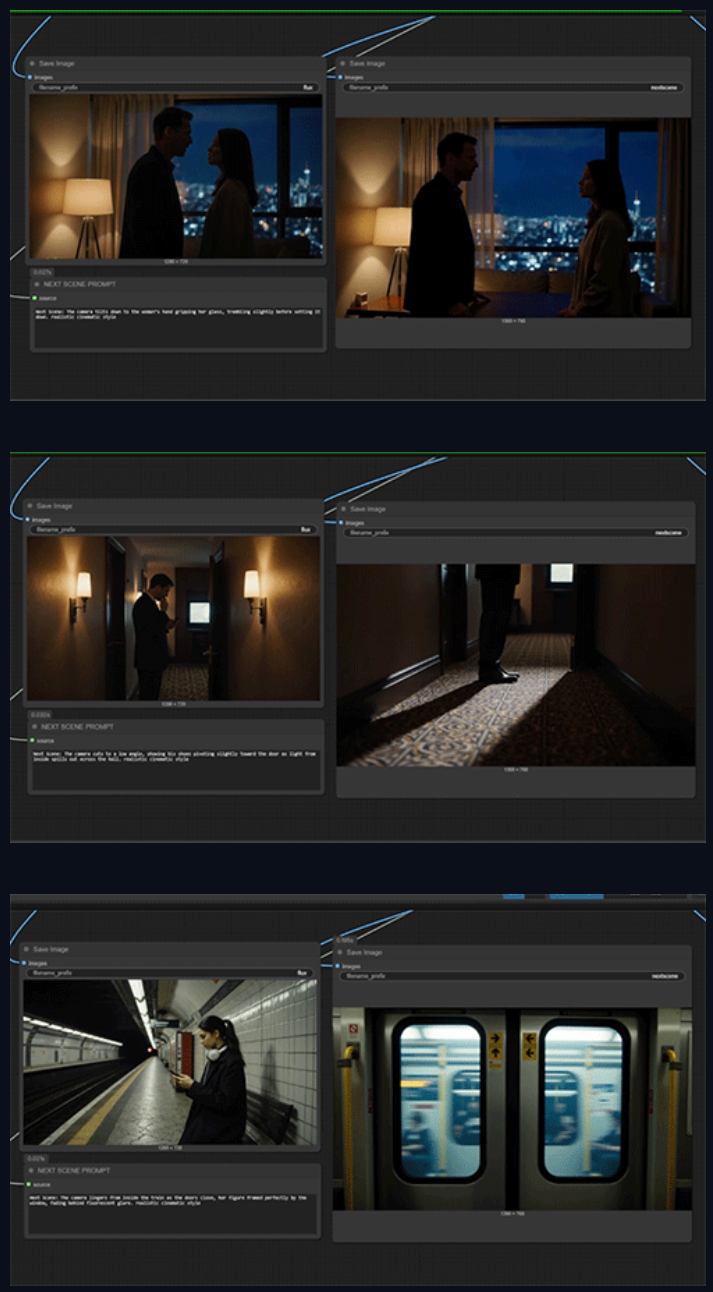
This LoRA brings cinematic storytelling continuity into AI image generation workflows.
Each output frame functions as the "Next Scene" in an evolving visual narrative, maintaining compositional coherence while introducing organic transitions such as:
Camera movement: Dolly shots, push-ins, pull-backs, and tracking moves
Framing evolution: Wide to close-up transitions, angle shifts, reframing
Environmental reveals: New characters entering frame, expanded scenery, spatial progression
Atmospheric shifts: Lighting changes, weather evolution, time-of-day transitions
Examples of Cinematic Logic:
"Next Scene: The camera pulls back from a tight close-up on the airship to a sweeping aerial view, revealing an entire fleet of vessels soaring through a fantasy landscape."
"Next Scene: The camera tracks forward and tilts down, bringing the sun and helicopters closer into frame as a strong lens flare intensifies."
"Next Scene: The camera pans right, removing the dragon and rider from view while revealing more of the floating mountain range in the distance."
______
next-scene-qwen-image-lora-2509 is a LoRA adapter fine-tuned on Qwen-Image-Edit (build 2509), purpose-built to generate cinematic image sequences with natural visual progression from frame to frame.
This model enables Qwen Image Edit to think like a film director—understanding camera dynamics, visual composition, and narrative continuity to create shots that flow seamlessly into one another.
🧠 What This Model Does
This LoRA brings cinematic storytelling continuity into AI image generation workflows.
Each output frame functions as the "Next Scene" in an evolving visual narrative, maintaining compositional coherence while introducing organic transitions such as:
Camera movement: Dolly shots, push-ins, pull-backs, and tracking moves
Framing evolution: Wide to close-up transitions, angle shifts, reframing
Environmental reveals: New characters entering frame, expanded scenery, spatial progression
Atmospheric shifts: Lighting changes, weather evolution, time-of-day transitions
Examples of Cinematic Logic:
"Next Scene: The camera pulls back from a tight close-up on the airship to a sweeping aerial view, revealing an entire fleet of vessels soaring through a fantasy landscape."
"Next Scene: The camera tracks forward and tilts down, bringing the sun and helicopters closer into frame as a strong lens flare intensifies."
"Next Scene: The camera pans right, removing the dragon and rider from view while revealing more of the floating mountain range in the distance."
⚙️ Usage Instructions
Basic Setup:
Load Qwen-Image-Edit 2509 as your base model
Add a LoRA Loader node and select
next-scene-qwen-image-lora-2509Set LoRA strength: 0.7 – 0.8 (recommended)
Structure your prompts with "Next Scene:" prefix for optimal results
Example Prompt:
Next Scene: The camera moves slightly forward as sunlight breaks through the clouds, casting a soft glow around the character's silhouette in the mist. Realistic cinematic style, atmospheric depth.
Pro Tips:
Begin prompts with camera direction for stronger continuity
Specify lighting and atmospheric changes for mood consistency
Chain multiple generations to create sequential storyboards
Works particularly well with landscape and establishing shots
next-scene-qwen-image-lora-2509 is a LoRA adapter fine-tuned on Qwen-Image-Edit (build 2509), purpose-built to generate cinematic image sequences with natural visual progression from frame to frame.
This model enables Qwen Image Edit to think like a film director—understanding camera dynamics, visual composition, and narrative continuity to create shots that flow seamlessly into one another.
🧠 What This Model Does
This LoRA brings cinematic storytelling continuity into AI image generation workflows.
Each output frame functions as the "Next Scene" in an evolving visual narrative, maintaining compositional coherence while introducing organic transitions such as:
Camera movement: Dolly shots, push-ins, pull-backs, and tracking moves
Framing evolution: Wide to close-up transitions, angle shifts, reframing
Environmental reveals: New characters entering frame, expanded scenery, spatial progression
Atmospheric shifts: Lighting changes, weather evolution, time-of-day transitions
Examples of Cinematic Logic:
"Next Scene: The camera pulls back from a tight close-up on the airship to a sweeping aerial view, revealing an entire fleet of vessels soaring through a fantasy landscape."
"Next Scene: The camera tracks forward and tilts down, bringing the sun and helicopters closer into frame as a strong lens flare intensifies."
"Next Scene: The camera pans right, removing the dragon and rider from view while revealing more of the floating mountain range in the distance."
⚙️ Usage Instructions
Basic Setup:
Load Qwen-Image-Edit 2509 as your base model
Add a LoRA Loader node and select
next-scene-qwen-image-lora-2509Set LoRA strength: 0.7 – 0.8 (recommended)
Structure your prompts with "Next Scene:" prefix for optimal results
Example Prompt:
Next Scene: The camera moves slightly forward as sunlight breaks through the clouds, casting a soft glow around the character's silhouette in the mist. Realistic cinematic style, atmospheric depth.
Pro Tips:
Begin prompts with camera direction for stronger continuity
Specify lighting and atmospheric changes for mood consistency
Chain multiple generations to create sequential storyboards
Works particularly well with landscape and establishing shots