BooruTagManager [macOS]



Details
Download Files
About this version
Model description
Overview
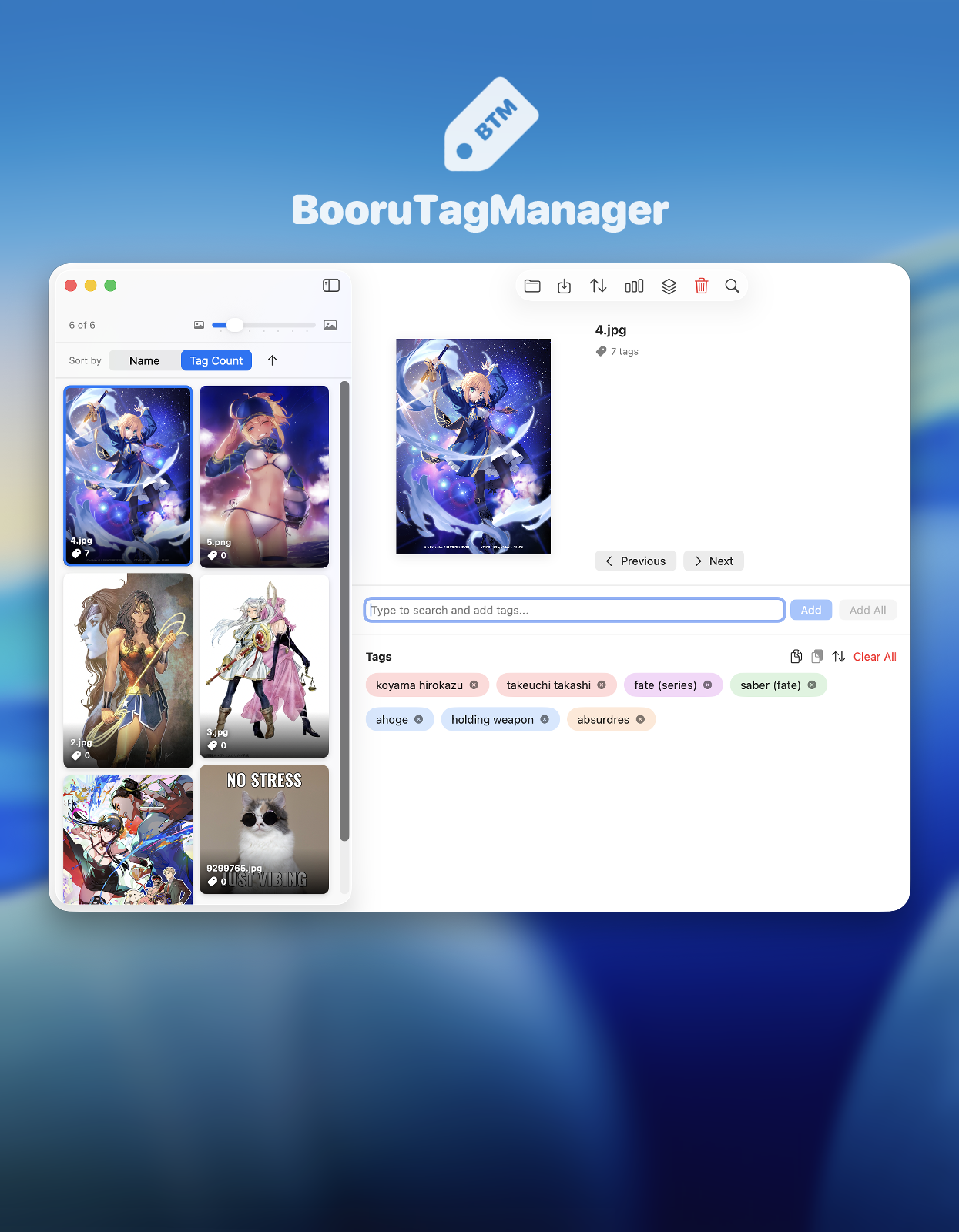
A powerful and intuitive macOS application for managing image tags with Danbooru/Gelbooru-style tagging conventions. Perfect for AI training datasets, art collections, and image organization. BooruTagManager is designed for users who need to efficiently tag large collections of images using the popular booru-style tagging system. Whether you're preparing datasets for machine learning, organizing digital art collections, or managing image libraries, BooruTagManager streamlines the entire tagging workflow.
Key Features
🖼️ Image Management
Batch Image Loading: Load entire folders of images at once
Grid View: Browse your images in a responsive, thumbnail-based grid
Image Preview: View images with a double-click in full-screen zoom mode
Zoom & Pan: Pinch to zoom and drag to pan in preview mode
Smart Navigation: Quickly move between images with Previous/Next buttons or keyboard shortcuts (⌘← / ⌘→)
🏷️ Advanced Tagging System
Intelligent Tag Suggestions: Real-time search with autocomplete based on your tagging history
Tag Categories: Support for 5 tag types matching booru conventions:
Artist tags (red) - Creator attribution
Copyright tags (purple) - Series/franchise names
Character tags (green) - Character names
General tags (blue) - Descriptive tags
Meta tags (orange) - Image metadata
Tag Database: Built-in comprehensive tag database with proper categorization
Usage Tracking: Tags are ranked by frequency, putting your most-used tags first
Keyboard Navigation: Tab through tags, arrow keys for suggestions, Enter to add
⚡ Productivity Features
Bulk Operations: Add tags to all images or filtered selections at once
Batch Tag Management: Find and replace, add, or remove tags across multiple images
Copy/Paste Tags: Copy tags from one image and paste to another (⌘⇧C / ⌘⇧V)
Drag & Reorder: Click and drag tags to reorder them within an image
Auto-Sort: Automatically sort tags by category and alphabetically
Smart Filtering: Search images by filename or tags
Auto-Save: Your work is automatically saved as you tag
📊 Organization Tools
Statistics Dashboard: View comprehensive stats about your collection:
Total images and tagged images
Tag usage frequency
Most popular tags
Tag type distribution
Tag Count Display: See at a glance how many tags each image has
Sorting Options: Sort images by name or tag count
Clear Interface: Clean, modern macOS-native interface
💾 Export & Compatibility
Text File Export: Exports tags to
.txtfiles alongside your imagesStandard Format: Compatible with AI training tools, booru sites, and other tagging applications
Preserve Originals: Never modifies your original image files
Bulk Export: Export all tags at once with one click
⌨Keyboard Shortcuts
⌘O: Load images from folder
⌘S: Export all tags
⌘F: Quick search/filter
⌘←/→: Navigate between images
Tab: Navigate between tags
↑/↓: Navigate tag suggestions
Esc: Close current action
⚙️Recommended Specs
macOS 26
Apple Silicon
🔐Privacy & Data
100% Local: All processing happens on your Mac - no data is sent to any server
No Tracking: No analytics, telemetry, or usage tracking
Your Data: You maintain complete ownership and control of your images and tags
💕Support & Feedback
For bug reports, feature requests, or questions, please leave a comment!
Version: 1.1 Last Updated: October 2025