Z-Image-Turbo-AIO-Workflow


详情
下载文件 (1)
关于此版本
模型描述
🚀 Z-Image-Turbo Advanced Workflows
Enhanced workflows with sliders, multi-LoRA, VRAM management, and professional detailing.
work - these are serious upgrades! 🚀
🎉 Advanced Workflows by sphiratrioth666
These workflows were modified and enhanced by user sphiratrioth666, based on the original Z-Image-Turbo-AIO workflows.
He integrated meaningful improvements and created an entirely new DETAILER workflow with SAM2 + SEGS!
Big thanks and full credits go to him! 🙏
Check out his work - these are serious upgrades! 🚀
📦 Three Workflow Variants:
1. 🎨 Txt2Img (Advanced)
Pure text-to-image with advanced controls
Key Features:
Interactive sliders (CFG, Steps, Denoise, Upscale)
4 LoRA slots with individual strength controls
PURGE VRAM automatic cleanup
Play/Stop regeneration system (save only finals!)
2D resolution slider (3:4, 4:3, 16:9)
Improved preview/save order (LQ → HQ)
Use when: You want maximum control over text-to-image generation
Extra nodes: MXToolkit, LayerUtility
2. 🎮 Img2Img + ControlNet
ControlNet precision with advanced controls
Key Features:
All Txt2Img features PLUS:
ControlNet Union (Canny, Depth, Pose, HED, MLSD)
Megapixel scaling (auto aspect ratio)
ControlNet strength slider
Input image guidance
Use when: You need precise control with reference images
Extra downloads: ControlNet Union file (~2.5GB) Save in: ComfyUI/models/model_patches/
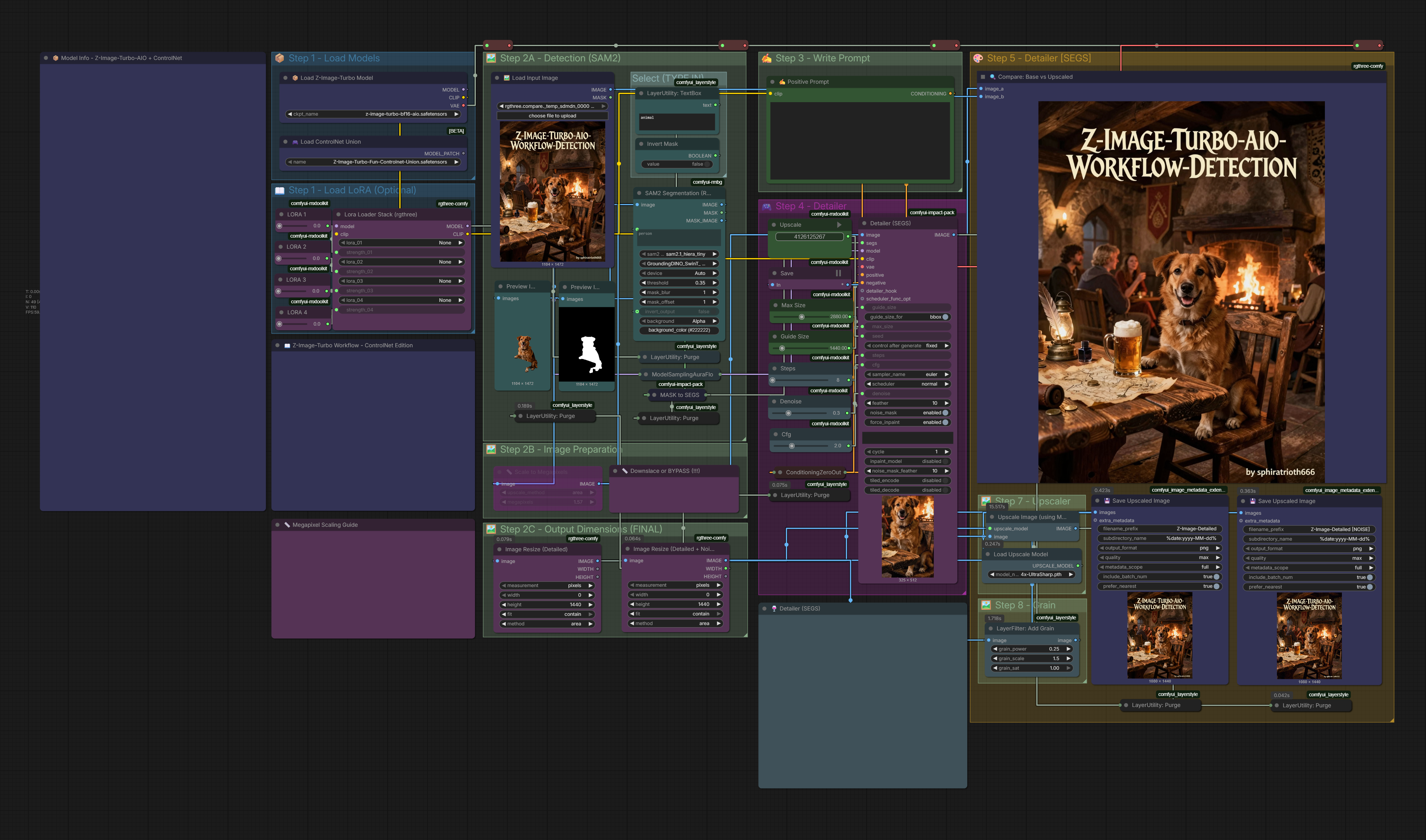
3. ✨ Img2Img + ControlNet + DETECTION
Professional pipeline with selective detailing
Key Features:
Everything from Img2Img PLUS:
SAM2 auto-segmentation (face, hands, details)
SEGS selective detailer
Model upscaler (4x to 10K resolution)
Grain addition for photographic look
Smart resize to 2K/4K (reasonable file size)
Multiple PURGE VRAM nodes
Use when: You need maximum quality for final outputs
Extra nodes: Impact Pack, SAM2 Extra downloads: Upscaler model, SAM2 model
🆚 Quick Comparison:
| Feature | Txt2Img | Img2Img | Detailer |
|---------|---------|---------|----------|
| Input Image | ❌ | ✅ | ✅ |
| ControlNet | ❌ | ✅ | ✅ |
| SEGS Detailer | ❌ | ❌ | ✅ |
| Complexity | Simple | Medium | Advanced |
| Speed | Fast (3-5s) | Medium (5-10s) | Slow (20-60s) |
| Quality | High | Higher | Maximum |
| Use Case | Quick gens | Controlled gens | Final portfolio |
🎯 When to Use Which:
Choose Txt2Img when:
✅ Pure text-to-image generation
✅ Quick iterations and testing
✅ Multiple LoRAs experimentation
✅ Don't need reference images
Choose Img2Img + ControlNet when:
✅ Have reference/input image
✅ Need pose/composition control
✅ Sketch-to-photo conversion
✅ Architectural work
✅ Want guided generation
Choose Detailer when:
✅ Creating portfolio pieces
✅ Professional/commercial work
✅ Need perfect face/hand details
✅ Want photorealistic texture
✅ Maximum quality required
✅ Don't mind longer processing
✨ Shared Features (All 3):
🎛️ Interactive Sliders:
CFG, Steps, Denoise
LoRA strengths (4 slots)
Upscale parameters
ControlNet strength (Img2Img variants)
🔄 Play/Stop System:
Green PLAY = Generate/regenerate
Purple SAVE = Save final only
No cluttered saves folder!
🧹 PURGE VRAM:
Automatic cleanup after generation
Prevents memory buildup
Better performance on all GPUs
📦 Multi-LoRA:
4 LoRA slots
Individual strength sliders
Easy on/off (set to 0.0)
📸 Metadata:
Auto-saved to images
Easy CivitAI uploads
📥 Downloads:
Main Model:
Z-Image-Turbo-AIO FP8/BF16
ControlNet Union (for Img2Img variants):
HuggingFace Download
⚠️ Save in: ComfyUI/models/model_patches/
Test Online:
TensorArt (FP8)
🎯 Required Custom Nodes:
All Workflows:
MXToolkit - Sliders & controls
rgthree-comfy - LoRA stack
LayerUtility - PURGE VRAM
Img2Img + ControlNet:
comfyui_controlnet_aux - Preprocessors
⚠️ ComfyUI 3.77+ required!
Detailer:
Impact Pack - SEGS detailer
SAM2 - Segmentation
⚠️ ComfyUI 3.77+ required!
⚙️ Settings (All Workflows):
Steps: 9 (slider adjustable)
CFG: 1.0 (slider adjustable)
Sampler: res_multistep or euler_ancestral
Scheduler: simple or beta
NO negative prompts needed
💡 Pro Tips:
Slider Workflow:
Start with defaults, adjust as needed
Set LoRA to 0.0 to disable
Use PLAY to test variations
Only SAVE final results
ControlNet Strength:
0.3-0.5 = Subtle guidance
0.6-0.8 = Balanced (recommended)
0.9-1.0 = Strong control
Detailer:
Best with 1024px+ input
Let SAM2 auto-detect regions
Grain at 10K = most natural
Downscale to 2K/4K recommended
PURGE VRAM:
Runs automatically
Helps weaker GPUs
Prevents memory issues
🎨 Example Workflow:
Quick Test (Txt2Img):
Load 1-2 LoRAs → 2. Write prompt → 3. PLAY → 4. Adjust sliders → 5. PLAY again → 6. SAVE
Controlled Gen (Img2Img):
Upload reference → 2. Choose preprocessor → 3. Load LoRAs → 4. Write prompt → 5. Adjust strength → 6. PLAY → 7. SAVE
Final Polish (Detailer):
Upload input → 2. Set up ControlNet → 3. Load LoRAs → 4. Write prompt → 5. PLAY (wait 30-60s) → 6. SAVE 2K/4K
❓ FAQ:
Q: Which workflow should I start with?
A: Txt2Img for learning, Img2Img for control, Detailer for finals.
Q: Do I need all custom nodes for all workflows?
A: No - each workflow lists its specific requirements.
Q: What's MXToolkit?
A: Provides the slider interface. Makes adjustments easier.
Q: Why PURGE VRAM?
A: Cleans memory after generation. Especially helpful on 8GB cards.
Q: Detailer too slow?
A: Yes, it's intensive. Use only for final images, not testing.
Q: Can I use original workflows instead?
A: Yes! These are advanced versions. Original workflows still work great.
Q: MXToolkit not working with ComfyUI 2.0?
A: Disable Node 2.0 interface for now. MXToolkit compatibility coming.
🙏 Credits:
Advanced Workflows: sphiratrioth666
Original Workflows: SeeSeeLP
Base Model: Tongyi Lab (Alibaba Group) - Z-Image-Turbo
License: Apache 2.0
Big thanks to sphiratrioth666 for the amazing enhancements! 🎉
📊 System Requirements:
Minimum:
VRAM: 8GB (all workflows tested on RTX 4060)
RAM: 16GB (32GB recommended for Detailer)
ComfyUI: 3.77+ (for ControlNet/Detailer)
Detailer additionally needs:
More processing time (~30-60s)
SAM2 and upscaler models
Patience! 😄
Updated: December 2025
Compatible: Z-Image-Turbo-AIO FP8 & BF16
Tested: RTX 4060 8GB, RTX 5090
"I upgraded your Z-Image workflow by a lot" - sphiratrioth666
Try all three workflows and find your perfect setup! 🚀