WAN2.2 I2V GGUF NSFW (8GB VRAM / 32GB RAM) WORKFLOW

Details
Download Files (1)
About this version
Model description
GOONING WORKFLOW FOR THE VRAM POOR!
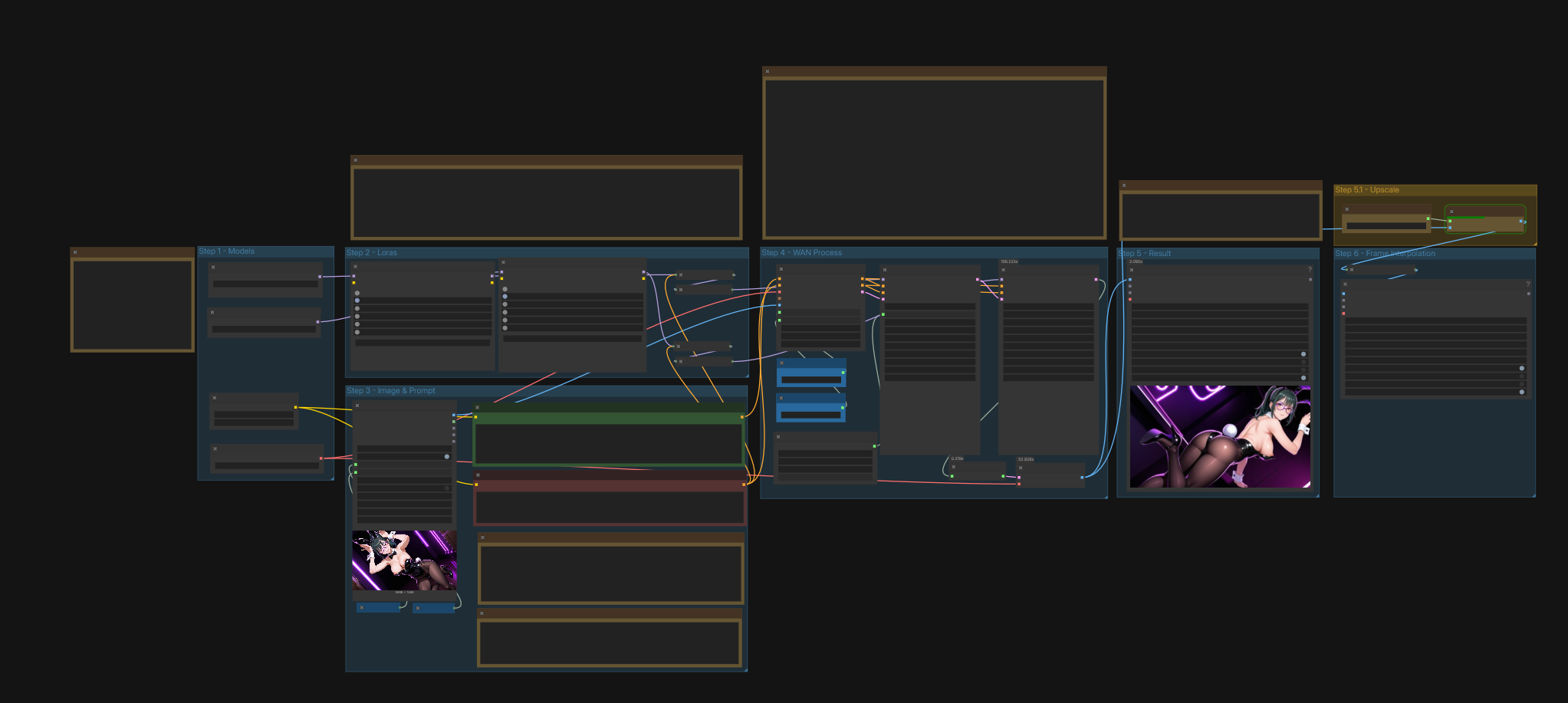
If you are VRAM poor just like me, this workflow is for you! You can generate NSFW videos with just 8GB VRAM and 32 GB RAM. Maybe even with lower specs if you use lower GGUF models. Everything is written as notes in the ComfyUI workflow but I will write it them again here.
IMPORTANT:
v1.3 (SageAttention) requires sage attention and nightly pytorch version to be installed. Unfortunately, I cannot provide tech support for those. Please spend some of your time and install them. They are worth it!
Always check the "About this version" from the right side to see the difference between workflows.
STEP 1 - MODELS
WAN2.2 I2V A14B GGUF:
Put WAN GGUF, SMOOTH MIX GGUF, or TASTYSIN GGUF models under unet folder.
I recommend Q6 for 8GB VRAM, you can download smaller versions if you have less VRAM or bigger versions if you have more.
Text encoder GGUF:
I recommend Q5_K_M for 8GB VRAM, you can download smaller versions if you have less VRAM or bigger versions if you have more.
VAE:
STEP 2 - LORAs
LoRAs:
You need this LORA if you want to produce videos with 4 steps only.
If you want to add more LORAs, just add them~!
STEP 3 - IMAGE AND PROMPT
START IMAGE:
The image proportions should be the same as video generation proportions. For example, if you are putting a 16:9 image, your generation proportion should be 16:9. Otherwise, weird things might happen. I always recommend putting a higher resolution image, it will be auto downsized to the generation resolution.
PROMPTS:
Check CIVITAI generations for more prompts and keywords for the LORAs you are using. As for the negative prompt, I have no idea what's best. Chinese? English? Less keywords? More keywords? No idea.
STEP 4 - WAN PROCESS
STEPS ( ! IMPORTANT ! ):
I have not seen much improvement when increasing the steps from 4 to 6. Leave them at 4 or experiment, up to you.
VIDEO SIZE & LENGTH:
The output is much cleaner and crispier if the INPUT images have the same dimensions. Use an image with higher resolution and it will be scaled down automatically. Just make sure the ratio (e.g. 16:9) is the same or similar.
Dimensions must be divisible by 16! For quick generations (testing), use these dimensions:
- 512 x 512 (SQUARE)
- 432 x 768 (9:16)
- 768 × 432 (16:9)
- 640 × 480 (4:3)
- 480 x 640 (3:4)
For final render, this is what my machine was capable of (8GB VRAM / 32GB RAM):
- 864 x 864 (SQUARE)
- 544 x 960 (9:16)
- 960 x 544 (16:9)
- 896 x 672 (4:3)
- 672 x 896 (3:4)
LENGTH:
81 frames for 5 seconds. I do not recommend trying longer or shorter duration using this workflow. It increased the generation time by a lot and the quality degrades. But if you must, the frame length must be divisible by 16 + 1.
KSampler:
Change noise_seed generation from "randomize" to "fixed" if you are happy with the testing result but want a higher resolution. Otherwise, leave everything else as it is if you do not know what you are doing.
Motion Amplitude:
Fixes no motion problem with WAN (e.g. camera rotation), this PainterI2V node is magic!
1.0 (original) > No difference from the original WAN node
1.15 (default) > General use
1.3 > Sports action
1.5 > Extreme motion
STEP 5.1 & 6 - Upscale and Frame Interpolation
DISABLE THESE WHILE TESTING OUTPUT (CTRL+B)
UPSCALE:
This model works great with anime images/videos. Feel free try other models.
FRAME INTERPOLATION
Free FPS increase! If you do not like the results, you can disable the frame interpolation and just save the upscaled video.