LICIK WORKFLOW
Details
Download Files (1)
Model description
A meticulously organized ComfyUI workflow designed for professional anime-style character generation with military-grade quality control. This workflow combines the power of the waiIllustriousSDXL_v160 base model with advanced interface design principles for maximum efficiency and quality.
### ✨ KEY FEATURES:
🔹 CLEAN, ORGANIZED INTERFACE:
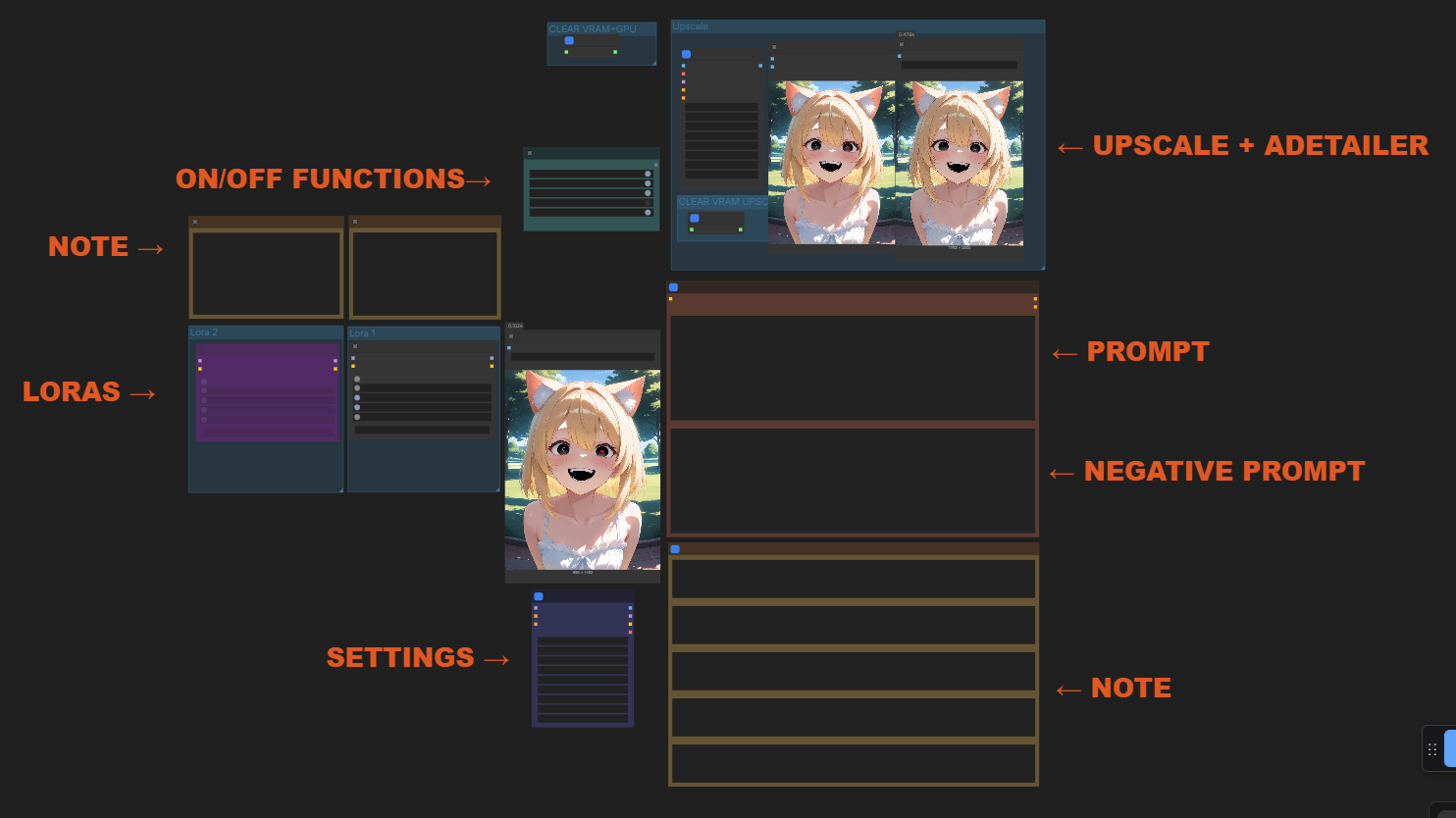
- Professional labeling system with color-coded section headers (← PROMPT, ← NEGATIVE PROMPT, ← UPSCALE, ← NOTE)
- Fast Groups Bypasser nodes allow one-click enable/disable of entire workflow sections
- All complex nodes are neatly grouped and hidden for maximum workspace clarity
- Color-coordinated visual hierarchy for intuitive navigation
🔹 ADVANCED QUALITY CONTROL:
- Built-in Image Comparer nodes for real-time before/after quality assessment
- Side-by-side comparison tools at critical workflow stages
- Visual feedback system to evaluate upscaling and detailing improvements
- Professional-grade quality checkpoints throughout the generation pipeline
🔹 FLEXIBLE LOADING SYSTEM:
- Power Lora Loader (rgthree) nodes for seamless LoRA management
- Multiple LoRA slots pre-configured for common enhancement types
- Individual toggle controls for each LoRA component
- Easy strength adjustment without workflow disruption
🔹 PRODUCTION-READY UPSCALING:
- 4x RealESRGAN Anime Upscaling realesrganX4plusAnime_v1.pt) built-in
- Automatic resolution optimization (832x1216 → 1472x2177)
- Integrated save points at every critical stage
- Dedicated upscale comparison tools to verify quality gains
🔹 OPTIMIZED FOR PERFORMANCE:
- RTX 4060 Ti friendly configuration with VRAM optimization
- Batch size 1 default for maximum stability on 8GB cards
- Efficient node routing for minimal generation time
- Toggle system to disable non-essential features during test runs
### ⚙️ TECHNICAL REQUIREMENTS:
Required Models:
- Checkpoint: waiIllustriousSDXL_v160.safetensors
- Upscaler: realesrganX4plusAnime_v1.pt
Required ComfyUI Extensions:
- rgthree-comfy (for Power Lora Loader, Fast Groups Bypasser, Label nodes, and Image Comparer)
- ComfyUI-Impact-Pack (recommended for advanced detailing capabilities)
- ComfyUI_UltimateSDUpscale (for optimal upscaling results)
### 🚀 HOW TO USE:
1. Install all required extensions (rgthree-comfy is essential)
2. Load the workflow into ComfyUI
3. Customize prompts in the dedicated CLIP text encode nodes
4. Toggle sections on/off using the Fast Groups Bypasser nodes:
- Enable/disable upscaling with one click
- Activate/deactivate specific LoRA packs
- Control workflow complexity based on your needs
5. Compare results using the built-in Image Comparer nodes to evaluate quality improvements
6. Save outputs at multiple stages (base generation, detailed, upscaled)
### 💡 PRO TIPS:
For Best Results:
- Use the Image Comparer nodes to verify upscaling quality before final save
- Toggle off non-essential features when doing quick test generations
- Leverage the organized labeling system to quickly navigate complex workflows
- Adjust LoRA strengths in the Power Lora Loader nodes for custom stylization
Performance Optimization:
- For 8GB VRAM cards like RTX 4060 Ti: keep batch size at 1
- Disable upscaling when doing prompt testing
- Use the toggle system to focus VRAM on active workflow sections
- Save intermediate results to avoid full re-generation
Customization Guide:
- Add your favorite LoRAs to the Power Lora Loader nodes
- Modify prompts in the CLIP text encode sections for different styles
- Adjust upscaling parameters for different resolution needs
- Recolor labels to match your personal workflow preferences
### 🎯 WORKFLOW STRUCTURE:
Left Side - Core Generation:
- Base SDXL generation with EmptyLatentImage
- LoRA management system with toggle controls
- Core prompt engineering section
Middle Section - Quality Control:
- Image Comparer nodes for visual verification
- Fast Groups Bypasser toggle system
- Save points at critical stages
Right Side - Advanced Features:
- Upscaling pipeline with quality verification
- Dedicated save nodes for different output stages
- Visual organization system with color-coded labels
### 🏆 WHY THIS WORKFLOW STANDS OUT:
✅ Professional organization - no more messy node spaghetti
✅ One-click toggles - enable/disable features instantly
✅ Built-in quality verification - see improvements in real-time
✅ VRAM optimized - perfect for RTX 4060 Ti and similar cards
✅ Production ready - save outputs at every critical stage
✅ Beginner friendly - clear labels guide you through each section
✅ Future proof - modular design allows easy expansion
Perfect for anime artists, character designers, and AI art professionals who demand both quality and workflow efficiency. This isn't just a workflow - it's a complete production pipeline designed for serious creators.
---
Preview Images Recommendation:
Include 2 comparison shots:
1. Base generation vs. final upscaled result
2. Screenshot showing the clean, organized interface with labels visible
Ready for Civitai upload! This workflow brings professional studio organization to ComfyUI character generation. 🚀✨