💪 UniFlex ⁘ 🔮 Krea 2 (((AIO))) + Anima · Bernini-R · Boogu-Img · Flux.2 Klein 9B · Ideogram 4 · Z-Img [BG Removal/SAM, ControlNet, LLM, Wildcards, Upscaling, +++]


세부 정보
파일 다운로드 (1)
이 버전에 대해
모델 설명
Introduction
💪 UniFlex isn't just a workflow...it's a unified flexible and extensible framework, where things look and work roughly the same regardless of the model used or imaging task required. The most commonly used tools for local AI image generation are at your fingertips, while a suite of power tools are at the ready when needed.
The workflow is heavily annotated 🗒️ and includes a number of pre-configured samples 📦 for you to learn and build, without needing to buy access or dig through intentional obfuscations (e.g., node stacking). Native ComfyUI nodes have been used as much as possible, with the Core 🦴 edition requiring only five custom node packages (or just three in one of the pre-configured samples!)...and chances are good you already have these!
🔮 Krea 2 is the flagship model for the latest major version. However, other models supported with annotations, instructions, and/or pre-configured workflows include Anima; Bernini-R; Boogu-Image [Edit]; Chroma1-HD; FireRed-Image-Edit; Flux.1 Dev; Flux.2 Klein 9B; Ideogram 4; Qwen-Image [Edit]; SDXL (incl. Illustrious, Pony, etc.); and Z-image.
Development and testing occurred on the following system:
Operating system: Linux Mint 22.3 Cinnamon with 124 GB RAM
Processor: 11th Gen Intel© Core™ i9-11900 @ 2.50GHz × 8
Graphics card: NVIDIA GeForce RTX 3060 with 12 GB VRAM
Browser: Google Chrome
Please report bugs 🪲 or errors 🚫, as well as successes 🤞 and requests/suggestions 📝. Post and share your SFW creations!!! I spent a lot of time working on this project (((for no 💰))), so I hope others make good use of it and find it helpful.

Power Tools *
Background Removal & Segmentation:
RMBG, BiRefNet, and SAM/SAM2/SAM3 segmentation
ControlNets, Detailing, & Inpainting:
🔮 Krea 2 reference images controls —so fun!...kind of like Flux Redux
🔮 Krea 2 Edit, with Krea 2 Identity Edit LoRA
LanPaint with Crop-and-Stitch
LLMs for Text & Vision:
Prompting:
Prompt enhancers, using an LLM
Wildcards (OutputLists Combiner)
Upscaling:
Model-based, PiD †, RTX Super Resolution, SeedVR2 †, and SUPIR †
XY Plots:
XY plots (OutputLists Combiner)
* = stripped down Core 🦴 edition is also included in the download package; † = native ComfyUI implementation
What's New?
[11.x] This major version represents a massive rebuild and reorganization!!! 🔮 Krea 2 is now the flagship model. A lot of custom nodes have been replaced with their ComfyUI equivalents. Many helpful annotations have been integrated throughout the workflow.
[11.5] Removed some additional (mostly fringe use) components: Krea 2 Projector Tuner custom nodes; Easy Region custom nodes (results with Krea 2 were very poor in limited testing); SDXL (refiner) clip text node; Qwen-Image DiffSynth ControlNet; and Z-Image Fun Union ControlNet. —two fewer custom node packages and two fewer "models missing" errors now!
[11.5] Additional tweaks and QOL improvements.
[11.4] Added Krea 2 Edit (community-developed / not official release): requires additional custom node package and LoRA.
[11.4] Reworked SeedVR2 group to give improved upscaled results.
[11.4] Moved the "Patches" subgraph to its own group (for easier muting), along with additional minor tweaks and QOL improvements.
[11.3] Added additional help regarding downloading models, including many links, visuals of the default ComfyUI folder structure, etc.
[11.2] Rebuilt the latent switch group (again), after a bug in ComfyUI was discovered that screwed up the indexing.
[11.2] Added back in a latent operation group that can be run between samplers.
[11.1] Reworked several upscalers: improved the PiD implementation: re-implemented SeedVR2 using native nodes (merged into ComfyUI July 10, 2026); removed SUPIR custom nodes, since this was already natively implemented using a model patch; removed Ultimate SD, but left instructions for download.
[11.1] Additional minor tweaks and QOL improvements.
Known Issues
[11.x] 🛑 LAYOUT NOT COMPATIBLE WITH NODES 2.0 🛑
[11.x] The included pre-configured sample workflows are provided for proof of concept, but the most up-to-date workflows will always be the 🔮 Krea 2 and 🔮 Krea 2 —Core workflows.
[11.x] Several argument flags are known to have incompatibilities with many models and configurations, so start ComfyUI without them when testing things out. These are known to have been problematic for me: --fast, --force-channels-last, --fp8_e4m3fn-unet, and --use-sage-attention.
[11.1] A ComfyUI bug with the native Custom Combo node inside of subgraphs messed with the latent switch indexing. Only impacts v11.1 and the bug has been reported.
[11.1] The SeedVR2 native nodes in ComfUI were merged July 10, 2026. —So update your ComfyUI to the very latest!
[11.0, 11.4] The 🔮 Krea 2 ControlNet and 🔮 Krea 2 Edit custom node packages may not yet be available in the Manager. They can be installed manually...or the nodes can just be deleted.
Quick Start
Install or update ComfyUI to the very latest version. Follow the official Comfy documentation or your favorite YouTube installation video, if needed.
Check that ComfyUI Manager is available, or install it.
Download the 🔮 Krea 2 model, along with its text encoder and VAE, from the Comfy-Org Hugging Face repository.
Open the pared down Core 🦴 edition of the 🔮 Krea 2 workflow in ComfyUI. (Later you can try the main workflow.)
Use the Manager to Install Missing Custom Nodes. (A couple of hot-off-the-presses 🔮 Krea 2 packages in the main workflow may not yet be available through the Manager, but can be installed manually...or the nodes can just be deleted.)
Restart ComfyUI.
Open the workflow again and follow the General Workflow Defaults instructions. For now, this will basically be to load your diffusion model, CLIP, and VAE (01a), and then temporarily bypass the LoRAs subgraph (03c; only the subgraph, not entire sub-group).
Run the default text-to-image recipe 🥣.
Enjoy your generated image creations! 😎
Navigation
The workflow is structured for flexibility. Many unconnected nodes have intentionally been included to provide options and ideas for endless tweaking. (The workflow does not employ Anything Everywhere, so if a node connection looks empty, it really is empty.)
In the Switchboard group, flip the yes|no 🔵 toggles to mute or unmute groups and the jump arrows ➡️ to quickly move to particular groups for adjustments. 🛑 Do NOT run the workflow with all switches flipped to yes! —except in the Core edition.

In the main workflow, once you have the main diffusion model, CLIP, VAE, and LoRAs in their correct working locations for your setup, you can ignore any additional missing model errors. If the scary red boxes bother you, in the Comfy > Workflow section of the settings, turn off Show missing models warning. (Alternatively, almost all of the problematic groups/subgraphs can just be deleted and the default workflow recipes should still work.)

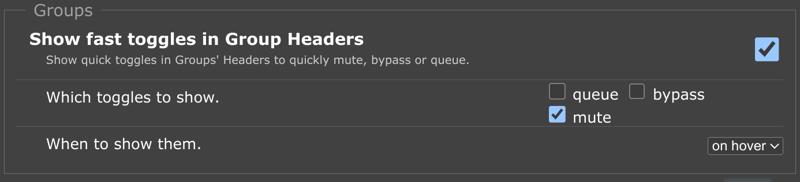
In the rgthree settings, it is also recommended to show fast toggles in group headers for muting.
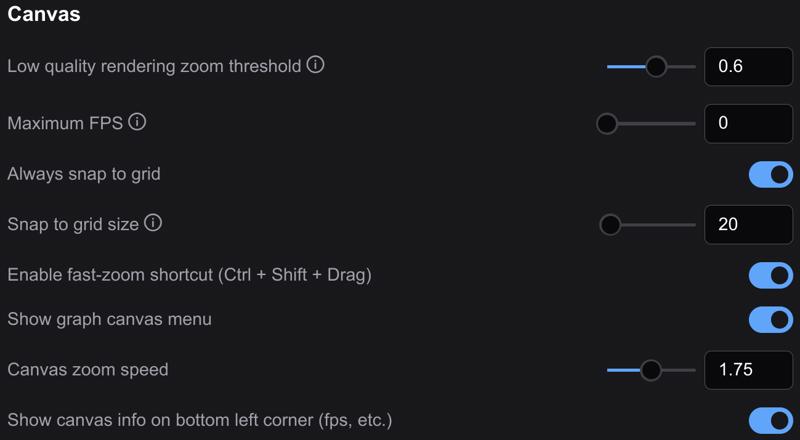
 In the Lite Graph section of the settings, enable the fast-zoom shortcut and set the zoom speed to around 1.5–1.75. The workflow was built with a snap to grid size of 20.
 Most of the workflow is unpinned 📌, so grab any empty space with your mouse to navigate around. You are welcome to pin 📌 anything you like to prevent accidentally moving groups or nodes.
Recipes
Run the default text-to-image recipe 🥣 to ensure you have the basics configured correctly before too much tweaking.
Once you have the workflow running, drag-and-drop your rendered image back onto the ComfyUI canvas to continue working. This ensures you will always have a good default workflow as fallback. 🏅
The workflow is heavily annotated 🗒️ and includes a number of pre-configured samples 📦 for you to learn and build!