OddReality



詳細
ファイルをダウンロード (1)
このバージョンについて
モデル説明
OddReality v2.0
V1 was a fun and somewhat messy experiment; v2 is a more advanced work. I slowly produced several hundred high-quality weird images to train a lycoris/locon designed to correct the flaws of OddReality and attempt to improve image composition, character staging and expressiveness, and the originality of creatures. Version 2 is the result of merging with this locon.
Here are the parameters I use for v2:
* cfg 6
* 25 steps
* Sampler dpmpp 2m
* Scheduler Karras.
Upscales:
Half of the images used for this model's presentation are direct upscales from 512x768 to 832x1248 with ultimate SD upscaler (and a denoise of 0.25). The other half went through hires.fix with the same resolution, generally with a high denoise (often 0.7) to produce creative variations. Oddreality is good with details; it often handles upscalers well.
I did not use other techniques for these images (no img2img, inpaint, or controlnet). Adetailer face is generally unnecessary.
Negative prompt:
Universal negative prompts tend to reduce OddReality's qualities (by increasing its coherence but moving it away from strangeness).
Here is a negative prompt I often use to compensate for the model's flaws and biases, which generally improves the render without reducing the quality and diversity of compositions: "static stick figure, sculpture, figurine, diorama, plaster, conformism, watermark, portrait, childish, out of focus, path, Bollywood, dog, rope, beak, backpack, hour, (blurry:0.5), (snow:0.5), (chiaroscuro:0.5)"
With many prompts, a negative weight on "Backlighting" or "chiaroscuro" (or both) is necessary to compensate for the excessive intensity of black.
And sometimes Oddreality is better without any negative prompt. It really depends on the prompt.
Changes from version 1:
OddReality 2 is more minimalist. I liked the maximalism of v1, but it created too many artifacts. The rendering is cleaner and the characters are more "normal," but they can become bizarre if you ask for it.
Oddreality has gained a better understanding of weird prompts. Everything related to the strange, the absurd, or surrealism has been the subject of a correction attempt with the goal of improving aesthetic quality, coherence, and the diversity of results. 100% of the images of my dataset are weird. You should test "amorphous creature" and "biomorphic structure" in your prompts.
OddReality's tendency to avoid portraits has also been increased. It is quite anti-human, and sometimes it will refuse to represent a character in a scene. It also has a more marked tendency towards nudity if you forget to specify that the characters are clothed. The appearance of individuals is random; I did not try to steer the model towards a particular physical type. My dataset contains adults of all ages, physical types, and genders, generally placed in scenes or interacting with the environment, so the model might listen a bit more to prompts asking for a character doing something.
For comfyui users:
Oddreality holds up well to low cfg/steps, which makes it practical for real-time workflows. I use it with the canvas editor node, at cfg 3 and 12 steps; it allows for transforming a rough sketch into an image in the model's style in real-time. This is particularly useful for poses or composition; you can make a quick sketch and get a near-instant result with each brushstroke (less than a second on my RTX 4070), and use the resulting image as latent, or use it to guide controlnet for another image.
For example, in this screenshot, for the prompt "amorphous creatures, biomorphic structure, beach, dawn, woman," (accompanied by the negative prompt I mentioned earlier):
* On the left, my failed sketch
* In the middle, Oddreality's interpretation (from the prompt and the sketch)
* On the right, the image that Oddreality would have produced without the sketch, just with the prompt.

The following image, which represents the standard quality of Oddreality at cfg 3 and 12 steps in 512x512, contains the comfyui workflow for using canvas editor with the parameters optimized for OddReality.

about canvas editor : https://github.com/Lerc/canvas_tab
OddReality v1.1
1.1 is brighter, correcting the too-black shadows of v1. Some prompts can now be slightly overexposed, I sometimes use a negative weight against yellow, orange or white as appropriate.
This version often produces more varied grids, designs and characters. I've reduced the bias towards masculinity and middle age.
I've also added some hardcore porn knowledge, but just to increase the strangeness of the results. OddReality remains difficult to use for porn and is not made for it, even if it produces very natural girls with realistic skin it tends to add weird creatures or body horror.
“nsfw” and “horror” in negprompt are often essential for normal use on most prompts. Without them, the model can sometimes throw up some really weird stuff.
a negative weight on path and road is also useful for increasing grid variety and reducing symmetry, as the model tends to want to represent a path through the forest (which is what it does when used without a prompt). I'll try to reduce this bias in the next version.
OddReality v1
Warning
OddReality is very dark, realistic and sometimes spontaneously adds horrific elements to its images. Weight your prompt against horror if you want to avoid this, or against body horror to limit nudity too. Characters are usually fully clothed by default, but some subjects tend to be nude.
Apart from realism and horror, the model's main strengths are architecture, mechanics and landscapes.
Settings
Sampler: DPM++ 2M SDE Heun Karras or DPM++ 2M SDE Karras.
Sampling steps: 25-30
CFG: 6-7
resolution: ar 3:4 is generally ideal, I use 576x768 for portrait or 768x1024 for architecture and landscape, but higher resolutions sometimes give more creative (and less coherent) results.
Hires.fix: R-ESRGAN 4x+, x1.5-2, 6 steps, denoise 0.4
Tips for prompts
OddReality has a strong aesthetic, so most of the usual quality tags in prompt or negprompt will bring little or no visible improvement and often reduce creativity and variety of results. Use these tags only if your prompt creates bad textures or inconsistencies.
This model has a maximalist style, very contrasted and a bit messy. When I want something simpler, precise, colorful and bright I use this negprompt which makes everything cleaner: “fucked up horror, messy charcoal drawing, worst quality sculpture”.
“Backlight” or “Shadows” in negprompt are also useful in certain cases.
Sometimes you'll also need to add indications of the type of light in your prompts, to compensate for the model's too-deep blacks.
Model bias
- Strong photorealistic bias.
- Strong anti closeup bias
- bias towards strangeness and horror.
- for the characters, bias towards fat, bearded 40-year-old guys in parka hiking through a pine forest in winter. OddReality doesn't like to do cute little things.
Comparison
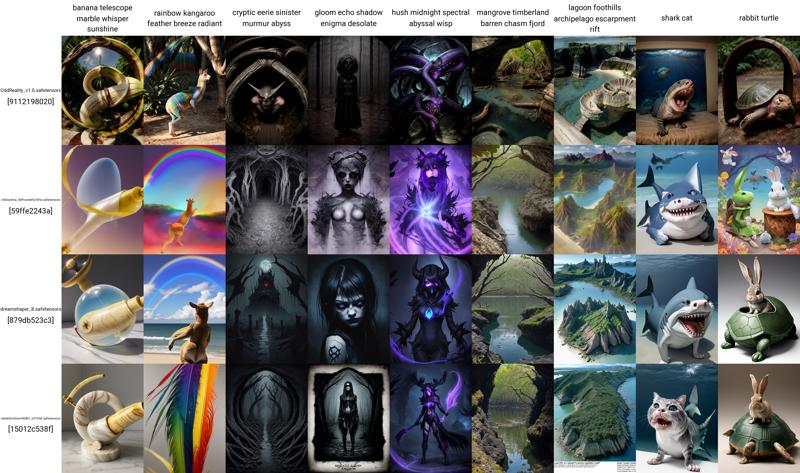
Here's a comparative batch with some popular realistic models: ChilloutMix, Dreamshaper and RealisticVision. So as not to bias the comparison, I've used random prompts based on words provided by chatgpt.
Age and gender
Despite its slight bias towards masculinity, middle age and overweight characters, Oddreality generally does what's asked of it, but if you want pretty girls you'll often have to force it a bit.

Control prompts
This batch shows my main control prompts, but I used many others.

I judged the results of the control prompts essentially on the basic criteria of image quality that every painter or illustrator knows and that every art student probably learns from the first hour of his or her first course: the quality of an image is judged from afar, on its composition, the originality and dynamism of the forms, the harmonies of color, the distribution of masses of light and shadow, the expressiveness. Precision doesn't count, it's not a quality criterion, just an artistic choice or a selling point for screens and printers.
Model origin
It's a mix designed mainly from OddlyTerrifying, RealisticVision and Animerge, but the bulk of the work was the integration of dozens of Loras, with a large majority of merge by substraction. My main aim was to remove anything that hindered realism, and anything that forced close-ups and character portraits when no character had been prompted.