LustiMix








Details
Download Files (1)
About this version
Model description
An interesting note to put in top of the description:
I've just reread all the recommendations made by nutbutter according to how BigASP2 was trained and I've done my own tests.
If you want really striking results, don't try to invent tokens, just look at this list and the tokens used for BigASP2. If you want to save time, take a look here
Take the tokens that will have the greatest impact and mix them together to obtain high-quality, personalized results.
This way you'll have fewer deformed bodies, deformed hands etc...
It is essential to understand how JoyCaption formats captions for optimized use of fine-tuned or merged models using BigASP2.
If you apply this recommendation plus the fact that you generate resolution higher than 832 + 1216 (1200 x 1552 is a good sweet spot without HiResFix) while keeping the same ratio : that's a bingo. 
-It's just a mix merge of the best models from the Lustify collection created by coyotte.
This merge contains the OLT + Endgame + Alpha V4 version.
Some people have complained that the OLT version looks too "synthetic", I'm not entirely agree, this version is in fact very good but requires a bit of time to understand and adjust the prompts.
But since I like experimenting and trying things out, I thought why not mix the best of Lustify and see what happens.
According to my tests, with models such as lustify / BigASP... You can push the resolution up to 2048px (Even if I prefer to stay in my safety zone around 1800px) without using HiresFix but by using Kohya HRFix. This allows you to gain a fair amount of definition and detail without encountering too many distortions (even if this happens more often) and also means faster generations.
Just try to start from this basic ratio of ‘832x1216’ and gradually work your way up while maintaining this ratio.
Why this ratio? Because nutbutter has used a lot of reference images with this resolution to train BigASP, so I may naively think that I have a better chance of getting good images if I use a higher resolution with the same ratio
I always use this useful plugin if I want to lock and keep my ratio.
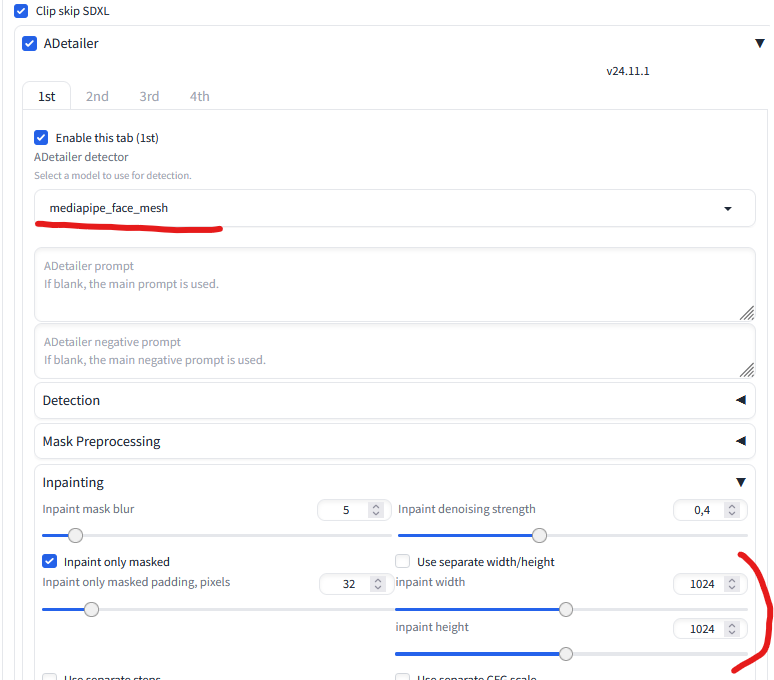
I also strongly recommend changing the "inpaint width and height" settings in Adetailer to 1024 and the use of the "mediapipe_face_mesh" model. Obvious for some, perhaps less so for others
🔥hint : if you want to add more precision / detail to your generations I also recommend using ‘PerturbationAttentionGuidance’, don't go beyond scale 2, I usually stop at 1 (Values that are too high can increase the number of deformations.).
I also use PAG for SD upscale script. With Denoising strength around 0.30.
So basically, my settings are like this for PAG and Kohya HRfix :

For the rest, I'm mainly using DPM++ 3M SDE + Karras at around 40 or 50 steps with a CFG scale around 3 and 4.
Don't ask me technical questions, I'm not a model checkpoints creator or finetuner, I just make Lora for fun and try to understand how to push the limits of SDXL.
Making a merge doesn't even take 5 minutes so all credits go to coyotte and nutbutter
(the hardest part is finding the right merge with the right settings, know at least where you want to go, a bit like trying out a new recipe.)
Merge was done this way :
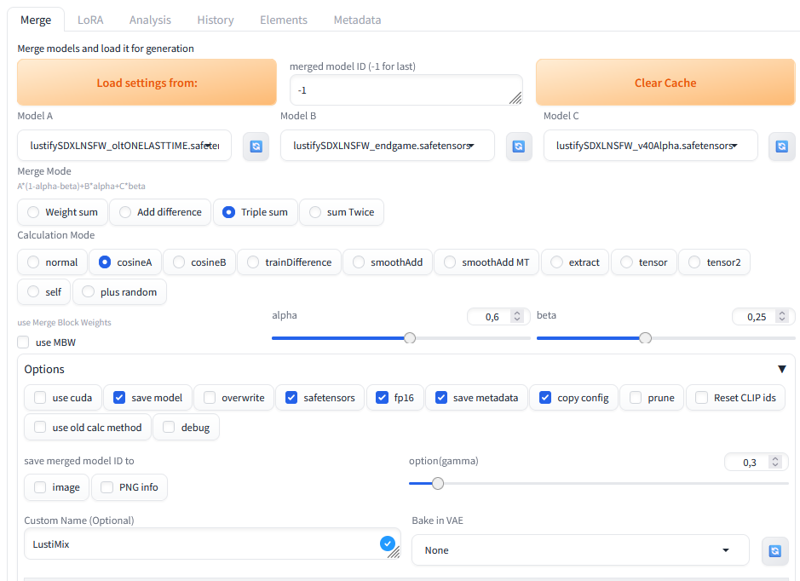 Maybe it's good, maybe it's bad, half good or bad.
I don't know, I like the results I get and that's what counts.
Try your own and see 🐈⬛