kiko-Illustrious


Details
Download Files (1)
About this version
Model description
kiko-Illustrious-v4.2
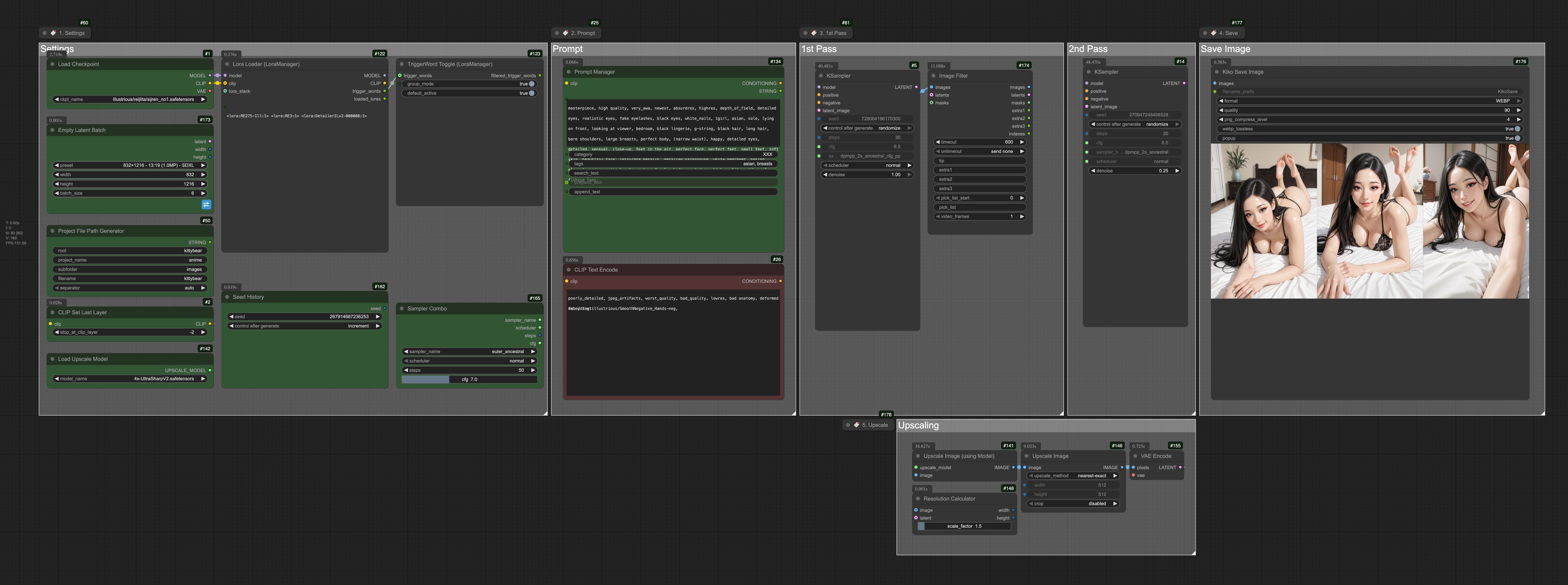
A simple and efficient ComfyUI workflow designed for the Illustrious model, with full compatibility for SDXL models as well.
Overview
This workflow provides a streamlined setup for experimenting with the Illustrious model family while maintaining compatibility with SDXL. It includes essential features like face enhancement, LoRA support, and flexible image processing options - perfect for getting started with Illustrious or as a foundation for more complex workflows.
Features
Illustrious & SDXL Compatible: Seamlessly works with both model types
Face Enhancement: Built-in FaceDetailer for improved portrait quality
LoRA Support: Power LoRA Loader for easy model enhancement
Flexible Sizing: Dynamic width/height controls with hires fix support
Image Processing: Advanced filtering and enhancement options
Node Management: Organized workflow with bookmark and set/get node functionality
Prompt Management: Save your prompts and view images in a gallery.
Prerequisites
ComfyUI installed and running
Python 3.8+ (for custom node dependencies)
Git (for cloning custom nodes)
Required Custom Nodes
This workflow requires the following custom nodes to be installed:
Core Workflow Nodes
Anything Everywhere? - Flexible node connections
Bookmark (rgthree) - Workflow organization
GetNode - Node management utilities
SetNode - Node management utilities
Power Lora Loader (rgthree) - Enhanced LoRA loading
Image Processing & Enhancement
FaceDetailer - Face enhancement and detailing
SAMLoader - Segment Anything Model integration
UltralyticsDetectorProvider - Object detection capabilities
Image Filter - Image filtering options
easy hiresFix - High-resolution image upscaling
Utility Nodes
ProjectFilePathNode - File path management
PromptManager - Save and Manage your prompts
Width/Height Literal - Dimension controls
mxSlider2D - 2D parameter controls
Installation
1. Install Custom Nodes
Navigate to your ComfyUI custom_nodes directory and install each required node:
cd ComfyUI/custom_nodes
# Core workflow nodes
git clone https://github.com/chrisgoringe/cg-use-everywhere.git
git clone https://github.com/rgthree/rgthree-comfy.git
git clone https://github.com/kijai/ComfyUI-KJNodes.git
# Image processing nodes
git clone https://github.com/ltdrdata/ComfyUI-Impact-Pack.git
git clone https://github.com/ltdrdata/ComfyUI-Impact-Subpack.git
git clone https://github.com/chrisgoringe/cg-image-filter.git
git clone https://github.com/yolain/ComfyUI-Easy-Use.git
# Utility nodes
git clone https://github.com/MushroomFleet/DJZ-Nodes.git
git clone https://github.com/comfy-deploy/comfyui-llm-toolkit.git
git clone https://github.com/giriss/comfy-image-saver.git
git clone https://github.com/Smirnov75/ComfyUI-mxToolkit.git2. Install Dependencies
Some nodes may require additional Python packages:
cd ComfyUI
pip install -r custom_nodes/ComfyUI-Impact-Pack/requirements.txt
pip install -r custom_nodes/ComfyUI-Easy-Use/requirements.txt
# Install other requirements as needed
3. Download the Workflow
Download kiko-Illustrious-v4.2.json and load it into ComfyUI.
Usage
Basic Setup
Load the workflow in ComfyUI
Set your model: Choose an Illustrious or SDXL checkpoint
Configure dimensions: Use the width/height controls for your desired output size
Add your prompt: Enter positive and negative prompts
Adjust LoRAs: Use Power LoRA Loader to add any LoRAs (optional)
GLLM-powered prompt assistanceenerate: Queue the prompt and generate your image
Advanced Features
Face Enhancement: The FaceDetailer node will automatically enhance faces in generated images. Adjust the detection threshold and enhancement strength as needed.
HiresFix: Enable the easy hiresFix node for high-resolution output with improved detail preservation.
2D Controls: Use mxSlider2D for intuitive parameter adjustment of multi-dimensional settings.
Model Compatibility
Recommended Models
Illustrious Models:
Illustrious-v0.1
Any Illustrious fine-tunes and merges
SDXL Models:
SDXL-base-1.0
Popular SDXL fine-tunes (Juggernaut, RealVis, etc.)
LoRA Support
The workflow supports standard LoRAs compatible with your chosen base model. Use the Power LoRA Loader for easy management and stacking of multiple LoRAs.
Troubleshooting
Common Issues
Missing Nodes Error: Ensure all custom nodes are properly installed and ComfyUI has been restarted.
Model Loading Issues: Verify your model files are in the correct ComfyUI models directory and are compatible with the selected model type.
Face Detection Not Working: Check that the SAM model files are downloaded and the detection threshold is appropriate for your image content.
Memory Issues: Reduce batch size or image dimensions if you encounter VRAM limitations.
Performance Tips
Use lower resolution for testing, then enable hiresFix for final output
Adjust face detection sensitivity based on your content
Consider disabling face enhancement for non-portrait images to save processing time
Contributing
Feel free to submit issues, suggestions, or improvements! This workflow is designed to be a starting point for Illustrious experimentation.
License
This workflow is provided as-is for community use. Please respect the licenses of the individual custom nodes and models used.
Acknowledgments
Thanks to the ComfyUI community and the developers of all the custom nodes that make this workflow possible. Special appreciation for the Illustrious model development team for creating such an impressive model to work with.